How to get to it
- Sidebar Automate (
sidebar-automations-link), then the Git Sync button in the dashboard header (automations-git-sync). Only users who can manage automations see it (always, locally). - Direct URL
/automations/git-sync. - No command-menu entry, keyboard shortcut or Automate sub-navigation tab leads here; the page shows no Dashboard/Templates tabs (see Gotchas).
- Leave with Back to Automations (a link, not a button) at the top of the page.
Before you start
Start with the common launch and health checks, then follow this family’s preconditions in order. Recipes share the fixtures and state named below.
Preconditions:
- Baseline state (fresh
launch --new, doctored,onboard --skip). No LLM profile is needed: sync cycles run git only. - Git Sync is unconfigured:
control-openhands api GET /api/automation/v1/git-sync/statusshows"repo_url": "","enabled": falseand"last_synced_commit": null. - A local repository to push to:
control-openhands fixture git-repo --name qa-sync-remote. Itspathoutput is<repo-path>below ($OH_VERIFY_RUN/workspace/qa-sync-remote). Sync to branchqa-sync, notmain: the fixture is a non-bare repo withmainchecked out, and git refuses pushes to a checked-out branch. Remote state is read with plaingit -C <repo-path> ...(read-only second view). - An inert automation for the pending-changes bullets, created right before Sync a changed automation:
control-openhands api POST /api/automation/v1/preset/prompt --write --data '{"name":"QA_F24 Sync","prompt":"QA git sync fixture; never runs.","trigger":{"type":"event","source":"qa-f24","on":"qa.f24.never"}}'. Itsidis<automation-id>; later bullets mark it changed withcontrol-openhands api PATCH /api/automation/v1/<automation-id> --write --data '{"enabled":false}'(ortrue), which is arrange, not proof. Sync a deletion deletes it again.
Behavior inventory
26 stable behavior IDs and their expected behavior
F24.openthe Git Sync button on the Automate dashboard and the direct URL open the page (h1Git Sync); Back to Automations returns to/automations. Read recipe ↓F24.loadinga skeleton (git-sync-skeleton) shows while health, permissions and status load. Read recipe ↓F24.overview-unconfiguredwith nothing configured the card readsDisabled,Not encrypted, RepositoryNot configured, Branchmain, Pathautomations,Never syncedtwice,Manual only, Pending0, and Sync now is disabled. Read recipe ↓F24.form-dirtySave Changes and Save and sync now stay disabled until a field differs from the stored value (reverting disables them again); Save and sync now also needs Enable Git Sync on. Read recipe ↓F24.check-failurea change to repository URL, branch or token is checked first (Checking repository...); an unreachable repo showsCould not reach the repository with these settingswith git's output and the hintFix the settings above, or press Save again to store them anyway., saves nothing, and a second Save stores the values anyway. Read recipe ↓F24.save-and-syncSave and sync now with a reachable repo saves (toastGit Sync settings saved.), then runs a cycle: the activity row goesSyncing... started Ns ago→Sync complete, and the card shows the short commit andLast synced Ns ago. Read recipe ↓F24.sync-nowa changed automation raises Pending changes (amber); Sync now showsSyncing...with1 pending, endsSync complete, drops Pending to0and pushes<path>/<slug>/automation.yamlto the branch. Read recipe ↓F24.sync-failurea failing cycle endsSync failedand shows the Last sync error banner with git's message and its age; the banner survives a reload and disappears after the next successful cycle. Read recipe ↓F24.encryptionsaving an encryption key turns the pill toEncryptedand the placeholder toAn encryption key is currently set; automations exported afterwards are ciphertext; Clear existing encryption key disables the input and saving it returns toNot encrypted. Read recipe ↓F24.tokenthe access token is a password field that is never shown again; changing it runs the reachability check; Clear existing token disables the input and saves a cleared token. Read recipe ↓F24.intervalSync every (seconds) savesNasEvery Ns, blank or0asManual only, and refuses negative numbers. Read recipe ↓F24.pauseturning Enable Git Sync off and saving (no reachability check) showsDisabled, disables Sync now and keeps the configuration; turning it back on restoresEnabled. Read recipe ↓F24.sync-disabled-errorSync now on a page that still showsEnabledafter sync was turned off elsewhere shows the toastEnable Git Sync before triggering a sync.; the pill catches up on the next idle poll (≤ 15 s). Read recipe ↓F24.background-syncwith an interval set, the backend runs cycles on its own and the open page picks up the new commit on its idle poll, without a reload. Read recipe ↓F24.repo-linkan http(s) repository is shown as a link (new tab) to the browsable URL without.gitand without embedded credentials, and the link text drops the credentials too; a local path stays plain text. Read recipe ↓F24.repo-link-sshan scp-style ssh remote (git@host:org/repo.git) is also shown as a link, rebuilt over https (https://host/org/repo); the label keeps the configured value. Read recipe ↓F24.sync-deletedeleting a synced automation raises Pending changes; the next cycle commits the removal of its<path>/<slug>/folder. Read recipe ↓F24.field-defaultsemptying Branch or Path and saving clears the override instead of storing an empty value: the card and inputs fall back tomainandautomations. Read recipe ↓F24.clear-repoemptying the repository URL is checked (No repository URL is configured.), and a second Save clears it: the card returns toNot configuredandDisabled. Read recipe ↓F24.backend-downwith the automation service down the page shows Automations Unavailable with Retry; Retry after the service is back shows the page with the stored configuration. Read recipe ↓F24.phonethe page fits a 390 px viewport without horizontal overflow; the card's fields stay in two columns. Read recipe ↓F24.unsupportedan automation backend without the Git Sync API (status 404) showsGit Sync is not available on this backendwith Back to Automations; the dashboard still shows the Git Sync button there. Read recipe ↓F24.no-accessa user withoutmanage_automations(Cloud member) seesGit Sync is managed by organization admins, and the dashboard hides the Git Sync button. Read recipe ↓F24.conflictsaving a repository, branch and path that another organization already syncs is refused (409) with a toast naming the conflict. Read recipe ↓F24.error-stateany other status failure shows the generic automation error panel with Retry. Read recipe ↓
Readable recipes
Read each script from top to bottom. Code is copied from the map; prose gives the action, expected observation, and conditions. <id>, <run> and similar placeholders stand for values from your own run. Short forms such as browser count continue the same control-openhands invocation; they are kept as documented.
Expected observations describe the recipe’s contract. Captures below selected recipes show representative real states from this snapshot; they do not mark every mapped behavior as passed. Follow cleanup before moving to another family.
No recipes match. Try another word or a behavior ID.
Open from the dashboard #
- Do
control-openhands browser goto /automations - Check
control-openhands browser click 'testid=automations-git-sync' --expect-url '/automations/git-sync(\?|$)' --observe 'testid=git-sync-skeleton' --observe-ms 2000 - ExpectThe observation lists the skeleton (state
"") for a few tens of ms, then<absent>. - Check
control-openhands browser text 'h1'is
Git Sync. - Check
control-openhands browser click 'role=link[name="Back to Automations"]' --expect-url '/automations(\?|$)' - Notethe URL is
/automations. - Do
control-openhands browser goto /automations/git-sync(direct URL) and
- Do
control-openhands browser screenshot --feature F24.open --name page-desktop --full-page
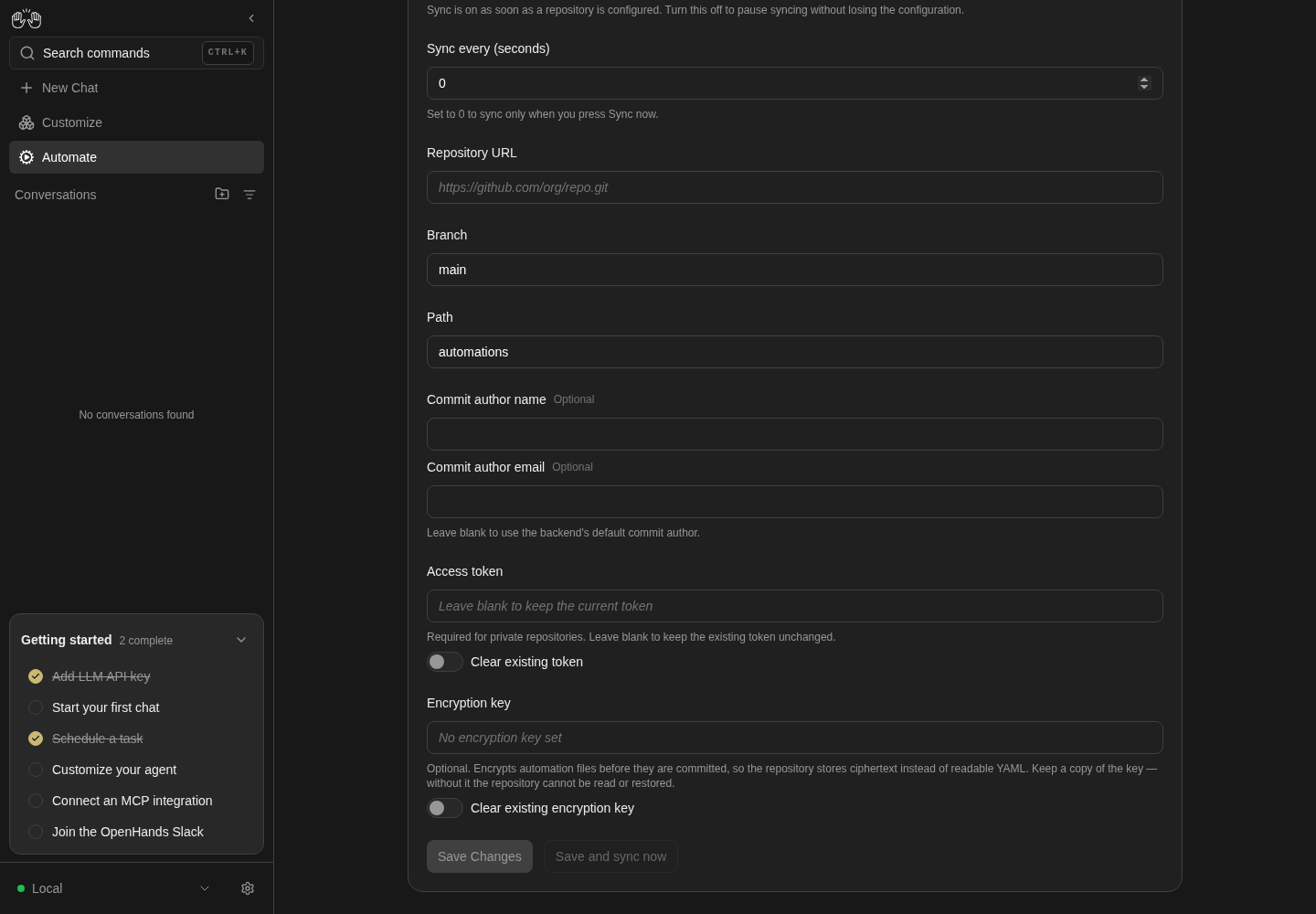
Lower Git Sync settings and Save actions are visible.
Inputs remain empty/default; no credentials entered or settings saved.
How this screenshot was taken
agent server: 1.53.0 · automation: 1.19.0 (launcher default) · canvas: 1.26.0
control-openhands browser goto /automations/git-sync
control-openhands browser scroll testid=git-sync-save-button
control-openhands browser screenshot --feature F24.open --name git-sync-settings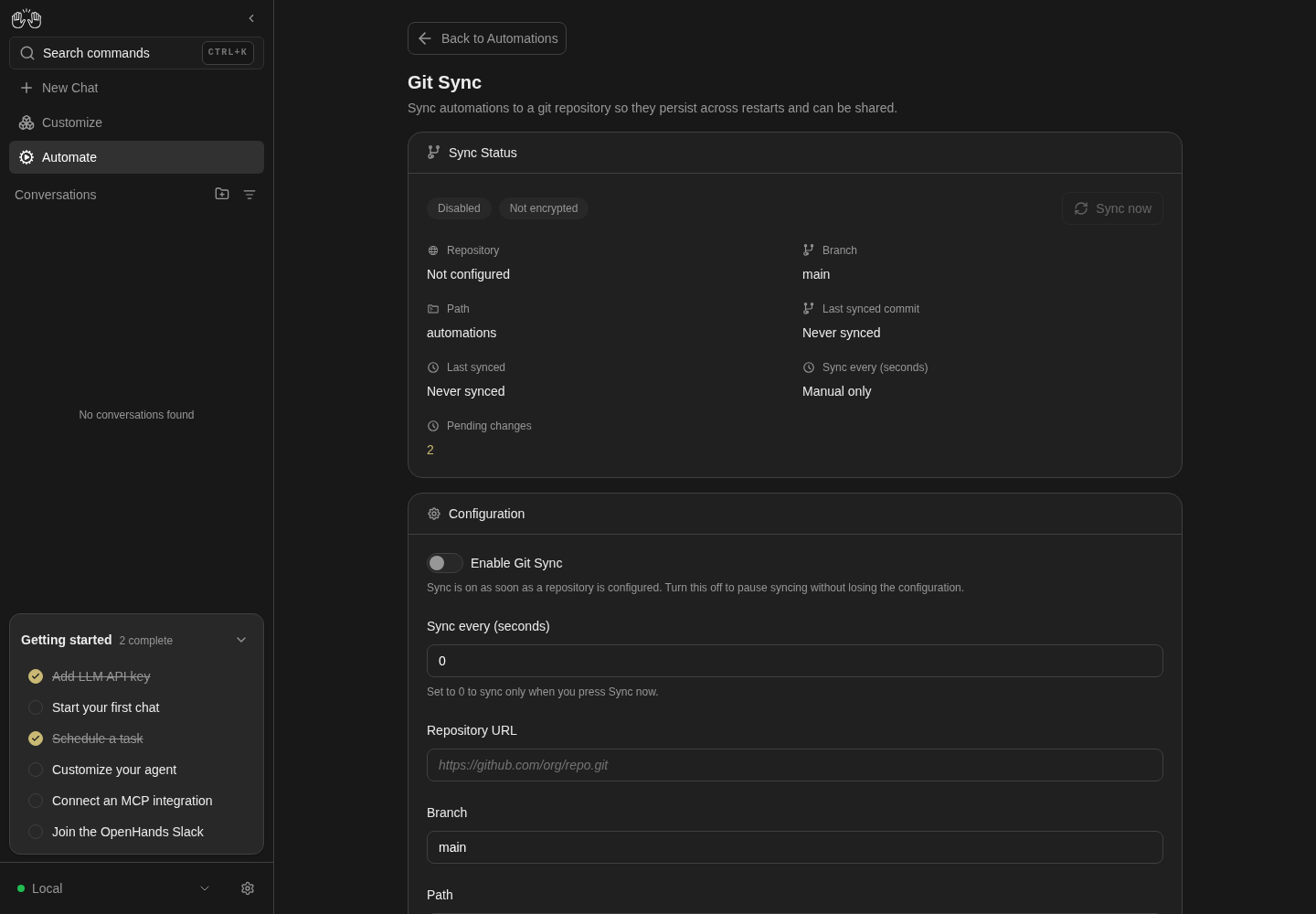
Git Sync page opens from the dashboard; no repository is configured and syncing is disabled.
Local configuration view only; no repository saved, encryption changed or sync cycle run. Pending changes are the disabled run-owned dummy definitions.
How this screenshot was taken
agent server: 1.53.0 · automation: 1.19.0 (launcher default) · canvas: 1.26.0
control-openhands browser goto /automations
control-openhands browser click testid=automations-git-sync --expect-url '/automations/git-sync(\?|$)'
control-openhands browser screenshot --feature F24.open --name git-sync
Unconfigured card #
- Check
control-openhands browser text 'role=heading[name="Sync Status"] >> xpath=ancestor::div[2]' - ExpectIt reads
Sync Status / Disabled / Not encrypted / Sync now / Repository / Not configured / Branch / main / Path / automations / Last synced commit / Never synced / Last synced / Never synced / Sync every (seconds) / Manual only / Pending changes / 0(newline-separated). - Check
control-openhands browser enabled 'testid=git-sync-now-button'is
false.
Dirty tracking #
- Check
control-openhands browser enabled 'testid=git-sync-save-button' - Noteand
enabled 'testid=git-sync-save-and-sync-button'are bothfalse. - Do
control-openhands browser fill 'testid=git-sync-interval-input' 300 - Note: Save is
true, Save and sync staysfalse(sync is off). - Do
control-openhands browser fill 'testid=git-sync-interval-input' 0 - Note: Save is
falseagain. - Check
control-openhands browser click 'testid=git-sync-enabled-switch >> xpath=ancestor::label' - Check
control-openhands browser eval "document.querySelector('[data-testid=git-sync-enabled-switch]').checked"is
trueand both buttons aretrue. - NoteClick the label again; Save is
false.
Unreachable repository #
- Check
control-openhands browser fill 'testid=git-sync-repo-url-input' /nonexistent/qa-missing.git - Do
control-openhands browser click 'testid=git-sync-save-button' --observe 'testid=git-sync-save-button' --observe-ms 3000 - Notethe observation includes
Checking repository.... - Wait
control-openhands browser wait 'testid=git-sync-check-failure' --timeout 25000 - Check
control-openhands browser text 'testid=git-sync-check-failure' - Note:
Could not reach the repository with these settings, git'sfatal: '/nonexistent/qa-missing.git' does not appear to be a git repository, thenFix the settings above, or press Save again to store them anyway.Take - Do
control-openhands browser screenshot 'testid=git-sync-check-failure' --feature F24.check-failure --name failure-block - Check
control-openhands api GET /api/automation/v1/git-sync/status - Notestill has
"repo_url": "". - NoteClick
testid=git-sync-save-buttonagain, then - Wait
control-openhands browser wait-text 'Git Sync settings saved.' --timeout 10000 - Note
browser count 'testid=git-sync-check-failure'is0. - NoteAfter
- Do
control-openhands browser reload - Check
control-openhands browser text 'testid=git-sync-enabled-pill'is
Enabled(configuring a repo turns sync on) and the card shows/nonexistent/qa-missing.gitas plain text (browser count 'testid=git-sync-repo-link'is0).
Failing cycle #
- Do
control-openhands browser click 'testid=git-sync-now-button' --observe 'testid=git-sync-activity-row' --observe-ms 8000 - ExpectThe observation goes
Syncing.../started 0s ago(counting up each second) and endsSync failed; - Check
control-openhands browser attr 'testid=git-sync-activity-row' data-stateis
failed. - Wait
control-openhands browser wait 'testid=git-sync-error-banner' --timeout 20000 - Check
control-openhands browser text 'testid=git-sync-error-banner' - Note:
Last sync error,git command failed (128): git clone --origin origin /nonexistent/qa-missing.git .,fatal: repository '/nonexistent/qa-missing.git' does not exist,Ns ago. - NoteScreenshot with
- Do
control-openhands browser screenshot --feature F24.sync-failure --name failed - NoteAfter
- Do
control-openhands browser reload - Notethe banner count is
1and the activity row count is0(the row is page-local).
Configure and Save and sync #
- Check
control-openhands browser fill 'testid=git-sync-repo-url-input' "$OH_VERIFY_RUN/workspace/qa-sync-remote" - Do
control-openhands browser fill 'testid=git-sync-branch-input' qa-sync - Do
control-openhands browser fill 'testid=git-sync-path-input' qa-automations - Do
control-openhands browser click 'testid=git-sync-save-and-sync-button' --observe 'testid=git-sync-activity-row' --observe-ms 10000 - ExpectThe observation goes
Syncing... started 0s ago→Sync completewithin a few seconds;browser count 'testid=git-sync-check-failure'andbrowser count 'testid=git-sync-error-banner'are0(a successful cycle clears the last error). - ExpectThe toast
Git Sync settings saved.also fires, but it is gone before a 10 s observation ends; to see it, run - Wait
control-openhands browser wait-text 'Git Sync settings saved.' --timeout 5000 - Noteright after the click instead of
--observe. - ExpectThe card text (as in Unconfigured card) shows
<repo-path>,qa-sync,qa-automations, a 7-character commit andLast synced / Ns ago. - Do
git -C <repo-path> log --oneline qa-syncshows the fixture's
Initial fixture commit(the cycle created the branch).
Sync a changed automation #
- NoteCreate
QA_F24 Sync(Preconditions), - Do
control-openhands browser reload - Check
control-openhands browser text 'text=Pending changes >> xpath=ancestor::div[1]/..'(
Pending changes / 1) and - Check
control-openhands browser attr 'text=Pending changes >> xpath=ancestor::div[1]/.. >> span.text-warning' class(
text-warning). - NoteScreenshot with
- Do
control-openhands browser screenshot --feature F24.sync-now --name pending - Do
control-openhands browser click 'testid=git-sync-now-button' --observe 'testid=git-sync-activity-row' --observe-ms 8000 - Note:
Syncing... / started 0s ago / 1 pending, then - Check
control-openhands browser text 'testid=git-sync-activity-row'is
Sync completeand Pending changes reads0. - Do
git -C <repo-path> log --oneline qa-synchas a new
Sync automations from agent servercommit whose short hash matches the card's Last synced commit, and - Do
git -C <repo-path> ls-tree -r --name-only qa-synclists
qa-automations/qa-f24-sync/automation.yamlandqa-automations/qa-f24-sync/tarball/....
Commit author #
- Do
control-openhands browser fill 'testid=git-sync-author-email-input' not-an-email - Check
control-openhands browser network --clear - Do
control-openhands browser click 'testid=git-sync-save-button' - Do
control-openhands browser eval "document.querySelector('[data-testid=git-sync-author-email-input]').validationMessage"(
Please include an '@' in the email address. 'not-an-email' is missing an '@'.); - Check
control-openhands browser networklists no
git-sync/configrequest. - NoteFill
testid=git-sync-author-name-inputwith'QA F24 Bot'andtestid=git-sync-author-email-inputwithqa-f24@example.com, click Save, - Wait
control-openhands browser wait-text 'Git Sync settings saved.' --timeout 10000 - Do
control-openhands browser reload - Check
control-openhands browser value 'testid=git-sync-author-name-input'is
""(the fields never show the stored author). - NoteMark the automation changed (PATCH
{"enabled":false}), - Do
control-openhands browser reload - Noteclick
testid=git-sync-now-button, - Wait
control-openhands browser wait '[data-testid=git-sync-activity-row]:not([data-state=running])' --timeout 30000 - Do
git -C <repo-path> log -1 --format='%an <%ae>' qa-syncis
QA F24 Bot <qa-f24@example.com>.
Encryption key #
- Check
control-openhands browser attr 'testid=git-sync-encryption-key-input' placeholderis
No encryption key set. - NoteFill it with
qa-f24-dummy-key, click Save (noChecking repository...: the key is not checked), wait forGit Sync settings saved., - Do
control-openhands browser reload - Note:
browser text 'testid=git-sync-encryption-pill'isEncrypted, the placeholder isAn encryption key is currently setand the input value is"". - NoteBefore changing the automation, run
- Check
control-openhands api GET /api/automation/v1/git-sync/status - Noterecord
- Do
git -C <repo-path> rev-parse qa-sync - Noteclick Sync now and wait as in Commit author, then read the head again and
- Check
git -C <repo-path> show qa-sync:qa-automations/qa-f24-sync/automation.yaml | head -c 20 - NoteExpected: the key save alone causes a new commit and ciphertext (
gAAAAA); known failure #551:dirty_countis0, the head is unchanged and the export stays plaintext. - NoteRecord this outcome before any PATCH.
- NoteContinue the separate dirty-export check: mark the automation changed (PATCH
{"enabled":true}if the Commit author bullet left it disabled, otherwise{"enabled":false};api GET /api/automation/v1/git-sync/statusmust showdirty_count≥ 1), reload, click Sync now and wait as in Commit author; the same git read starts withgAAAAA. - ExpectThis PATCH arranges a dirty automation; its passing export does not prove the key-save re-export contract.
- NoteRecord the encrypted head, fill the key input with a different dummy key, Save, wait for the toast, reload and Sync now without changing the automation.
- NoteExpected: the head and ciphertext change for the new key; known failure #551:
dirty_countstays0and the head and ciphertext remain unchanged. - NoteIf that failure occurs, arrange ciphertext under the new key with a separate enabled-state PATCH and sync before the clear test; do not count that repair as a key-rotation pass.
- NoteThen fill the key input with any text, run
- Do
control-openhands browser click 'testid=git-sync-clear-encryption-key-switch >> xpath=ancestor::label' - Check
control-openhands browser enabled 'testid=git-sync-encryption-key-input'is
falseand its value is"". - NoteClick Save, wait for the toast, reload: the pill is
Not encrypted, the placeholderNo encryption key set, and the clear switch is unchecked again. - NoteRecord the encrypted head, read
git-sync/status, click Sync now and wait without changing the automation, then compare the head and exported file. - NoteExpected: a new commit contains plaintext; known failure #551:
dirty_countis0, the head is unchanged and ciphertext remains despite theNot encryptedpill. - NoteRepeat the non-dirty set, rotate and clear checks at
browser viewport phone, arranging plaintext before set and ciphertext before rotate/clear; record desktop and phone separately with the actual selected backend in each evidence entry.
Access token #
- Check
control-openhands browser attr 'testid=git-sync-token-input' typeis
passwordand the placeholderLeave blank to keep the current token. - NoteFill it with
qa-dummy-token, run - Check
control-openhands browser network --clear - Noteclick Save with
--observe 'testid=git-sync-save-button' --observe-ms 2000(showsChecking repository...), wait for the toast; - Check
control-openhands browser network --last 6lists
/api/automation/v1/git-sync/checkthen/api/automation/v1/git-sync/config. - ExpectAfter reload the token input is
"". - Do
control-openhands browser click 'testid=git-sync-clear-token-switch >> xpath=ancestor::label' - Note
browser enabled 'testid=git-sync-token-input'isfalse. - NoteClick Save, wait for the toast, reload;
browser eval "document.querySelector('[data-testid=git-sync-clear-token-switch]').checked"isfalse.
Interval #
- NoteFill
testid=git-sync-interval-inputwith300, Save, wait for the toast, reload: the card'sSync every (seconds)field readsEvery 300s(control-openhands browser text 'role=heading[name="Sync Status"] >> xpath=ancestor::div[2]') and the input value is300. - NoteFill it with
'', Save, reload:Manual onlyand input0. - NoteFill
-5and click Save:browser eval "document.querySelector('[data-testid=git-sync-interval-input]').validationMessage"isValue must be greater than or equal to 0.; reload to drop the draft.
Pause and resume #
- NoteClick
testid=git-sync-enabled-switch >> xpath=ancestor::label;browser enabled 'testid=git-sync-save-and-sync-button'isfalse. - Check
control-openhands browser network --clear - Noteclick Save, wait for the toast;
- Check
control-openhands browser networklists no
git-sync/check. - ExpectAfter reload the pill is
Disabled,enabled 'testid=git-sync-now-button'isfalseand the card still shows<repo-path>; screenshot--feature F24.pause --name disabled. - ExpectThe switch's help text (
control-openhands browser text 'testid=git-sync-enabled-switch >> xpath=ancestor::label/following-sibling::p') isSync is on as soon as a repository is configured. Turn this off to pause syncing without losing the configuration.Click the switch label again, Save, wait for the toast: the pill isEnabled.
Trigger while disabled elsewhere #
- NoteWith the page showing
Enabled, arrange - Arrange
control-openhands api PUT /api/automation/v1/git-sync/config --write --data '{"enabled":false}'(another admin pausing), then immediately
- Do
control-openhands browser click 'testid=git-sync-now-button' - Wait
control-openhands browser wait-text 'Enable Git Sync before triggering a sync.' --timeout 5000 - ExpectThe pill still says
Enabledat first; - Wait
control-openhands browser wait 'testid=git-sync-enabled-pill >> has-text=Disabled' --timeout 20000 - Notesucceeds within about 15 s.
browser errors --app-onlylists the induced503on/api/automation/v1/git-sync/sync(expected). - NoteTurn sync back on through the form (switch label, Save).
Repository link #
- NoteFill
testid=git-sync-repo-url-inputwithhttps://qa-user:qa-pass@git.example.invalid/qa-org/qa-repo.git, click Save,browser wait 'testid=git-sync-check-failure' --timeout 30000(git's output redacts the URL ashttps://***@git.example.invalid/...; the failure itself isCONNECT tunnel failed, response 502behind the sandbox proxy, a resolve error elsewhere), click Save again, wait for the toast, reload. - Check
control-openhands browser attr 'testid=git-sync-repo-link' hrefis
https://git.example.invalid/qa-org/qa-repoandattr ... targetis_blank. - Check
control-openhands browser text 'testid=git-sync-repo-link'is
https://git.example.invalid/qa-org/qa-repo.git: the link text dropsqa-user:qa-pass@and keeps.git. - NoteScreenshot with
- Do
control-openhands browser screenshot 'role=heading[name="Sync Status"] >> xpath=ancestor::div[2]' --feature F24.repo-link --name https-link - NoteRestore: fill the URL with
"$OH_VERIFY_RUN/workspace/qa-sync-remote", Save, wait for the toast;browser count 'testid=git-sync-repo-link'is0(a local path is plain text).
Interval cycle #
- NoteRead the current short commit from the card (
control-openhands browser text 'text=Last synced commit >> xpath=ancestor::div[1]/..',<old-hash>). - NoteFill
testid=git-sync-interval-inputwith20, Save, wait for the toast; the card readsEvery 20s. - NoteMark the automation changed (PATCH
{"enabled":false}), do not reload, and run - Wait
control-openhands browser wait 'text="<old-hash>"' --state detached --timeout 60000 - ExpectIt succeeds within about 35 s (interval plus the page's 15 s idle poll); the card shows a new hash and
Last synced / Ns ago, matching - Do
git -C <repo-path> log --oneline -1 qa-sync - NoteSet the interval back to
0(fill, Save, toast) so later bullets are not raced by background cycles.
Sync a deletion #
- NoteArrange the deletion (owned by F21):
- Arrange
control-openhands api DELETE /api/automation/v1/<automation-id> --write(status
204). - Do
control-openhands browser reload - Note
browser text 'text=Pending changes >> xpath=ancestor::div[1]/..'isPending changes / 1. - Do
control-openhands browser click 'testid=git-sync-now-button' --observe 'testid=git-sync-activity-row' --observe-ms 6000(
Syncing... / started 0s ago / 1 pending→Sync complete); Pending changes reads0. - Do
git -C <repo-path> log --oneline -1 qa-syncis a new
Sync automations from agent servercommit matching the card's Last synced commit, and - Do
git -C <repo-path> ls-tree -r --name-only qa-synclists only the fixture's
README.mdandsrc/...files:qa-automations/qa-f24-sync/is gone.
Empty branch and path #
- Do
control-openhands browser fill 'testid=git-sync-branch-input' '' - Noteand
browser fill 'testid=git-sync-path-input' '', thenbrowser click 'testid=git-sync-save-button' --observe 'testid=git-sync-save-button' --observe-ms 2000(Checking repository...: the branch changed;mainexists in the fixture, so the check passes) andbrowser wait-text 'Git Sync settings saved.' --timeout 10000. - ExpectAfter
browser reloadthe card reads Branchmainand Pathautomations,browser value 'testid=git-sync-branch-input'ismainandbrowser value 'testid=git-sync-path-input'isautomations; - Check
control-openhands api GET /api/automation/v1/git-sync/statushas
"branch": "main"and"path": "automations". - NoteDo not press Sync now here:
mainis the fixture's checked-out branch.
ssh remote link #
- NoteFill
testid=git-sync-repo-url-inputwithgit@github.com:qa-org/qa-repo.git, click Save,browser wait 'testid=git-sync-check-failure' --timeout 30000(here git reportsssh: not found; with ssh installed it is an auth or host-key failure), click Save again, wait for the toast, reload. - Check
control-openhands browser attr 'testid=git-sync-repo-link' hrefis
https://github.com/qa-org/qa-repo,attr ... targetis_blankandbrowser text 'testid=git-sync-repo-link'isgit@github.com:qa-org/qa-repo.git.
Clear the repository #
- NoteFill
testid=git-sync-repo-url-inputwith'', click Save, - Wait
control-openhands browser wait 'testid=git-sync-check-failure' --timeout 25000 - Noteits text is
Could not reach the repository with these settings / No repository URL is configured. / Fix the settings above, .... - NoteClick Save again, wait for the toast, reload: the card reads
Disabledand RepositoryNot configured(branch, path and last commit stay), and the URL input is""with its placeholderhttps://github.com/org/repo.git.
Phone layout #
- Do
control-openhands browser viewport phone - Check
control-openhands browser bbox 'role=heading[name="Sync Status"] >> xpath=ancestor::div[2]'(
insideViewporttrue,pageHorizontalOverflowfalse) and - Check
control-openhands browser screenshot --feature F24.phone --name status - Note: two columns of fields, long paths wrap.
- Check
control-openhands browser scroll 'testid=git-sync-repo-url-input' - Check
control-openhands browser bbox 'testid=git-sync-save-and-sync-button'(
pageHorizontalOverflowfalse) and - Do
control-openhands browser screenshot --feature F24.phone --name form - NoteReturn with
- Do
control-openhands browser viewport desktop
Automation service down #
- Do
control-openhands service stop automation - Do
control-openhands browser reload - Wait
control-openhands browser wait-text 'Automations Unavailable' --timeout 40000 - Notethe page shows the heading,
The automations backend is not available right now...and Retry, and no Back link. - NoteScreenshot with
- Do
control-openhands browser screenshot --feature F24.backend-down --name unavailable - Check
control-openhands browser network --clear - Do
control-openhands browser click 'role=button[name="Retry"]' - Check
control-openhands browser networkshows a new
/api/automation/healthrequest and the panel stays. - Do
control-openhands restart - Noteclick Retry again and
- Wait
control-openhands browser wait 'testid=git-sync-enabled-pill' --timeout 15000 - Note: the page is back with the stored configuration.
- Check
control-openhands doctoris
ok.
Old backend #
- NoteNeeds a second, fresh run on an automation release without the Git Sync API (1.7.1 is the last one; 1.8.0 added
git_sync/router.py). - NoteStop the main run first if memory is short, then
- Arrange
export OH_VERIFY_RUN=$(OH_VERIFY_RUN= control-openhands launch --new --automation-ref 1.7.1 --print-run)(uvx installs the tag from GitHub),
- Check
control-openhands doctor(
ok) and - Do
control-openhands onboard --skip - Check
control-openhands api GET /api/automation/v1/git-sync/statusis
404. - Do
control-openhands browser goto /automations/git-sync - Wait
control-openhands browser wait-text 'Git Sync is not available on this backend' --timeout 20000 - Notethe page also reads
The automation backend is running a version without the Git Sync API. Update it to a version that supports Git Sync.with Back to Automations below it. - NoteScreenshot with
- Do
control-openhands browser screenshot --feature F24.unsupported --name unsupported - Check
control-openhands browser click 'role=link[name="Back to Automations"]' --expect-url '/automations(\?|$)'returns to the dashboard, where
browser count 'testid=automations-git-sync'is still1.browser errors --app-onlylists only the expected404ongit-sync/status. - Do
control-openhands stop - Notethis run.
No permission · Blocked prerequisite #
- NoteBlocked: local backends always grant
manage_automations. - NoteNeeds a Cloud backend signed in as an organization member (not admin or owner); expected
Git Sync is managed by organization admins/Only organization admins and owners can view and configure Git Sync.at/automations/git-sync, and - Check
control-openhands browser count 'testid=automations-git-sync' - Note
0on/automations.
Repository taken by another org · Blocked prerequisite #
- NoteBlocked: the local backend has one organization.
- NoteNeeds two Cloud orgs; saving the same URL, branch and path in the second shows the error toast
Another organization already syncs this repository, branch and path. Sharing them would import each other's automations; use a different repository or path.and keeps the form dirty for a retry.
Status error #
- NoteNot driven: no non-mocked way makes
GET /api/automation/v1/git-sync/statusfail with a non-404 status while/api/automation/healthis ok. - NoteExpected: the generic automation error panel with Retry.
Clean up #
- ExpectThe fixture automation was deleted in Sync a deletion (
control-openhands api GET /api/automation/v1lists none) and Git Sync is cleared by Clear the repository; the fixture repo goes away with the run. - NoteCheck
- Check
control-openhands browser errors --app-only - Noteon the main run:
pageErrorsis0, and only the induced503ongit-sync/syncfrom Trigger while disabled elsewhere and the502s on/api/automation/health,git-sync/status,telemetry/consentandsdk-versionwhile the service was stopped are expected.
Gotchas and known limits
- Configuring a repository is what turns sync on: the backend's pause switch defaults to on, so the first save of a URL flips the pill to
Enabledeven though the switch was never touched, and clearing the URL turns it off again. The help text under the switch says so (Sync is on as soon as a repository is configured. ...). A pause is the exception: it survives clearing and re-entering the URL, so the pill staysDisableduntil the switch is turned back on. - A local path (or
file://URL) is a valid remote, which is what makes this family drivable without credentials. Use a branch other than the fixture's checked-outmain: git's defaultreceive.denyCurrentBranchrefuses pushes to a non-bare repo's checked-out branch (not driven here; every recipe usesqa-sync). - The reachability check runs only when repository URL, branch or token changed (
git ls-remote, 20 s timeout). Interval, path, author, encryption key and the enable switch save without it. A check that cannot run at all (old backend, network error) never blocks a save. - The second Save after a failed check saves the same values without checking again; editing any checked field re-arms the check.
- The activity row (
git-sync-activity-row,data-staterunning/succeeded/failed) is page state: it disappears on reload and does not appear for a background cycle that starts and ends between two idle polls (15 s). Assert background cycles through the commit hash, not the row. - Toasts (
Git Sync settings saved.,Enable Git Sync before triggering a sync.) last a few seconds: read them withbrowser wait-textimmediately after the click, never after a long--observewindow. - Save's label cycles
Save Changes→Checking repository...(only when a checked field changed) →Saving...→Save Changesin about 100 ms against a local repo;--observe 'testid=git-sync-save-button'records it. - Expected: setting, rotating or clearing an encryption key re-exports every automation: the next sync rewrites plaintext as ciphertext (
gAAAAA…), rewrites ciphertext with the new key, or restores plaintext after clearing. Known failure (reproduced 2026-10-08, automation 1.19.0, desktop and phone, selected backend Local): each key-only save leavesdirty_countat0; Sync now reportsSync completewithout a new commit. Setting a key leaves existing files plaintext, rotating retains the old ciphertext, and clearing retains ciphertext despite theNot encryptedpill. A separate automation change does export under the current key setting, but does not satisfy key-only re-export (OpenHands/automation#551, fixed by OpenHands/automation#563 after the 1.19.0 release; re-drive onceconfig/defaults.jsonversions.automationincludes it). - Nothing on the page says whether a token is stored: the token placeholder is always
Leave blank to keep the current token, and the author fields always reload blank. Prove author changes from the commit (git log --format='%an <%ae>'). - The card's Repository value drops embedded credentials, as link text and as plain text: an http(s) URL loses its whole
user:token@(a token alone in the user slot too), other schemes keep the user and lose only the password (ssh://git@host:2222/...), and the rest stays as configured. The Repository URL input andGET /api/automation/v1/git-sync/statusstill carry the credentials, so a screenshot of the form shows them. Never type a real token into the URL. - The page has no Automate sub-navigation (Dashboard / Templates) and no command-menu entry; leave through Back to Automations (
role=link, not a button). - Deleted automations stay in Pending changes until a cycle pushes the removal; after cleanup with sync off the card can read
Pending changes 2. Sync a deletion pushes it while the repository is still configured. - An untouched Enable Git Sync switch follows the server: after another admin pauses sync, the next idle poll flips both the pill and the switch off, so turning it back on is one label click plus Save.
F24.unsupportedneeds--automation-ref(uvx fetchesgit+https://github.com/OpenHands/automation@1.7.1); without GitHub access it stays blocked. The control CLI does not forwardOH_AUTOMATION_VERSION, so a PyPI release cannot be selected directly.- Arrange with
api ... --writeonly to mark automations changed or to simulate another admin; the save, check and sync steps must go through the form.
Source paths: src/routes/automation-git-sync.tsx, src/components/features/automations/git-sync/, src/hooks/query/use-git-sync.ts, src/types/git-sync.ts, src/routes/automations-list.tsx (the Git Sync button).