How to get to it
- Sidebar Customize (
sidebar-skills-link); on desktop it lands on/mcp. On a phone, open the drawer (sidebar-mobile-menu-toggle) first; it lands on the hub. - Direct URLs
/customizeand/mcp. - Command menu (
Control+k/Meta+k): Customize (to/customize, then/mcp) and MCP servers (to/mcp). The menu itself is F02. - Customize sub-navigation row MCP Servers (
sidebar-extensions-/mcp), desktop aside or phone hub. Pinning Customize as home is F02. - The onboarding checklist item Connect an MCP integration links to
/mcpand is ticked once a server is configured, before any conversation uses it (F02). - On
/mcp: a library card or its + toggle (install modal), Add custom server (mcp-add-custom-server), an installed card (editor) and its health-row buttons.
Before you start
Start with the common launch and health checks, then follow this family’s preconditions in order. Recipes share the fixtures and state named below.
Preconditions:
- Baseline state (launched, doctored,
onboard --skipdone) on a fresh run, so nothing is installed yet (control-openhands api GET /api/settings --pick agent_settings.mcp_configis{}). uvxandnpxon the machine.F17.agent-uses-server,F17.custom-add-remote's agent check and the disabled-server check need an active LLM profile (control-openhands llm preset deepseek).- TLS-intercepting proxy (this sandbox): MCP stdio servers start with a minimal environment (
HOME,PATH, no proxy or CA variables), so without trust settingsuvx/npxcannot download packages and catalog STDIO installs fail.launchnow seeds the run's privateHOMEwhenSSL_CERT_FILEorNODE_EXTRA_CA_CERTSpoints at a CA bundle: check withcat "$OH_VERIFY_RUN/private/home/.config/uv/uv.toml"(native-tls = true) andcat "$OH_VERIFY_RUN/private/home/.npmrc"(cafile=<bundle>). Only if they are missing, write them once:mkdir -p "$OH_VERIFY_RUN/private/home/.config/uv",printf 'native-tls = true\n' > "$OH_VERIFY_RUN/private/home/.config/uv/uv.toml"andprintf 'cafile=/root/.ccr/ca-bundle.crt\n' > "$OH_VERIFY_RUN/private/home/.npmrc"(use your proxy's CA bundle path).F17.install-errormoves them aside for one step. Custom servers can also passUV_NATIVE_TLS=truein their env. Skip all of this on a machine with direct internet. F17.custom-add-remoteneeds a local Streamable HTTP MCP server (arrange, not proof; nofixtureverb exists for it yet): from a shell,cd "$OH_VERIFY_RUN/workspace" && (PORT=38417 nohup npx -y @modelcontextprotocol/server-everything streamableHttp > "$OH_VERIFY_RUN/private/qa-shttp.log" 2>&1 &), pick any free port, and wait until the log saysMCP Streamable HTTP Server listening on port 38417. Stop it in Cleanup by its own PID (pgrep -f 'server-everything streamableHttp'lists it; neverpkill -f).F17.cloud-navandF17.native-git-tabsneed an OpenHands Cloud backend (with git providers configured); not available here.F17.stored-secret-reuseandF17.single-request-mutationsusecontrol-openhands fixture mcp-server --name qa-vault; it prints the<node>binary and<server.mjs>path the recipes substitute.F17.credential-probesends a dummy token to GitHub's hosted MCP endpoint and, through the catalog's npx stdio server, to Slack; both need the network. Behind the TLS-intercepting proxy the stdio server's own HTTPS call fails unless it gets the proxy CA (NODE_EXTRA_CA_CERTS), which only the custom editor can pass.- Never type real credentials: every key below is a dummy.
Behavior inventory
30 stable behavior IDs and their expected behavior
F17.customize-redirecton desktop, the sidebar Customize link, the URL/customizeand the command-menu items Customize and MCP servers all land on/mcp. Read recipe ↓F17.mobile-hubbelow 1024 px (phones and tablets),/customizeis a hub with the same four rows and badge; at phone width detail pages show a Back chevron to the hub; widening the window to 1024 px or more on/customizeredirects to/mcp. Read recipe ↓F17.breakpoint-sweepat 767, 768, 820, 1023, 1024 and 1440 px,/customizeis the hub below 1024 px and the desktop aside from 1024 px up, and the MCP page keeps Add custom server, a search box wider than 150 px and no horizontal overflow. Read recipe ↓F17.page-states/mcpshows the Model Context Protocol (MCP) header, Add custom server, the toolbar, an Installed section (empty-state copy when nothing is installed) and the Library grid, without page errors. Read recipe ↓F17.searchone search box filters the library and the installed list (catalog name, description and args count); no match showsNo matches for your search.in each section; the X clears it. Read recipe ↓F17.section-filterthe All / Installed / Library dropdown shows only the chosen sections. Read recipe ↓F17.library-cataloglibrary cards (logo, name, transport, description, + toggle) open the install modal by click, + toggle or Enter; the modal closes with Cancel, X or Escape. Read recipe ↓F17.install-remotea remote (HTTP) entry shows its fixed URL read-only and atype="password"credential field that is required. Read recipe ↓F17.install-oauthan entry whose server runs OAuth itself shows the OAuth info panel instead of a key field. Read recipe ↓F17.install-unsupportedentries the local backend cannot install (provider-OAuth only, 12 today such as Sentry) should be hidden or explain themselves; today their modal is empty and Install does nothing (fail). Read recipe ↓F17.install-argsan entry with argument fields (Filesystem's Paths (space separated)) requires them and appends each whitespace-separated token to the stored command's args. Read recipe ↓F17.install-stdioa STDIO entry shows its read-only command; Install showsVerifying…,Saving..., toastsMCP server saved.and adds a card with the catalog name and description. Read recipe ↓F17.install-errora failed install test keeps the modal open with a red error and saves nothing. Read recipe ↓F17.save-as-secretpassword credential fields carry Also save as secret (checked by default, with a tooltip); after install the value is listed in Settings → Secrets. Read recipe ↓F17.custom-validationthe custom editor refuses bad input with an inline message (URL required/invalid/wrong protocol, name invalid or duplicate, command required or with spaces, env/header notKEY=value, header required, OAuth secret without client ID, timeout out of range). A malformed header line reuses the environment-variable message (fail). Read recipe ↓F17.test-connectionTest connection in the editor showsVerifying…, then a greenConnected — N tool(s) availableor a red categorized error; Add/Save tests first and stays open on failure. Read recipe ↓F17.custom-addAdd Server saves and closes; the card is listed after a reload. Read recipe ↓F17.custom-add-remotea custom Streamable HTTP (SHTTP) server with a Bearer token connects, saves as anHTTPcard showing its URL, reopens with the token masked, and its tools reach the agent as<server>_<tool>. Read recipe ↓F17.server-healtheach card's health row runs Test connection (Checking connection…), then shows a verdict with a coloured dot; a failure is red, worded for the transport (a STDIO command that cannot start, a remote server that cannot be reached) with the Agent Server's detail, and offers Retry. Read recipe ↓F17.enable-disablethe card toggle disables a server without removing its configuration; the state persists and a disabled server is withheld from new conversations. Read recipe ↓F17.custom-editclicking a card opens Edit MCP server prefilled (secrets shown as**********); Save tests and persists the change. Read recipe ↓F17.stored-secret-reusea saved server's env values and tokens come back from the settings API and in the editor as**********; the editor's Test connection swaps each placeholder for the stored encrypted value (never the placeholder text, never the plaintext) and Save leaves untouched secrets out of its sparse patch, so a Save from the edit form that keeps them changes only the edited fields. Read recipe ↓F17.single-request-mutationsadding, editing or deleting one server sends exactly onePOST,PATCHorDELETEto/api/settings/mcp/<name>and leaves sibling servers and their stored credentials untouched. Read recipe ↓F17.credential-probea catalog entry whose server lists its tools with any credentials (Slack) also gets a read-only credential probe during Install and Test connection: a failed probe readsCredential check failed: <provider error>and saves nothing (Known failure, reproduced 2026-10-08: any errored probe call, a networkfetch failedincluded, is worded as a credential failure; #18161). A hosted server that rejects the token at connect (GitHub) never reaches a probe and readsConnection failed: … 401 Unauthorized …, also saving nothing (Known failure, reproduced 2026-10-08: the Agent Server'sPOST /api/mcp/testreturns the 401 aserror_kindunknown, so the modal cannot call it a credential failure; OpenHands/software-agent-sdk#5607); a server the catalog does not know gets no probe. Read recipe ↓F17.delete-serverDelete in the editor asks for confirmation; Cancel keeps the server, Confirm removes it withMCP server removed.Read recipe ↓F17.native-git-tabson a Cloud backend, GitHub/GitLab/Bitbucket offer a recommended native-integration tab next to the MCP tab (blocked here). Read recipe ↓F17.agent-uses-servera conversation started after the save can call the server's tools. Read recipe ↓F17.phonethe MCP page, the install modal and the custom editor fit a 390 px viewport. Read recipe ↓
Readable recipes
Read each script from top to bottom. Code is copied from the map; prose gives the action, expected observation, and conditions. <id>, <run> and similar placeholders stand for values from your own run. Short forms such as browser count continue the same control-openhands invocation; they are kept as documented.
Expected observations describe the recipe’s contract. Captures below selected recipes show representative real states from this snapshot; they do not mark every mapped behavior as passed. Follow cleanup before moving to another family.
No recipes match. Try another word or a behavior ID.
Desktop entry points #
- Do
control-openhands browser goto /conversations - Check
control-openhands browser click 'testid=sidebar-skills-link' --expect-url '/mcp(\?|$)' - Check
control-openhands browser count 'testid=mcp-page'(
1). - Do
control-openhands browser goto /customize - Wait
control-openhands browser wait-url '/mcp(\?|$)' - NoteCommand menu: run
- Do
control-openhands browser goto /conversations(the browser is on
/mcp, where the URL wait would pass at once), - Do
control-openhands browser press Control+k - Do
control-openhands browser type 'testid=command-menu >> role=combobox' MCP - Do
control-openhands browser press Enter - Wait
control-openhands browser wait-url '/mcp(\?|$)' - Noterepeat with the term
Customize(its only option readsCustomize Browse skills, plugins, and integrations.). - NoteEvery path ends on
/mcp.
Desktop sub-navigation #
- NoteOn
/mcprun - Check
control-openhands browser text 'testid=extensions-navbar-desktop' - Note:
Customize,MCP Servers,Skills,Plugins,Apps, thenThese settings are synced from Local backend (<base url>). - Check
control-openhands browser attr 'testid=sidebar-extensions-/mcp' aria-currentis
page. - Check
control-openhands browser click 'testid=sidebar-extensions-/skills' --expect-url '/skills(\?|$)' - Notethat row's
aria-currentbecomespage. - NoteDo the same for
/pluginsand/apps, then return with - Check
control-openhands browser click 'testid=sidebar-extensions-/mcp' --expect-url '/mcp(\?|$)' - Do
control-openhands browser screenshot 'testid=extensions-navbar-desktop' --feature F17.desktop-subnav --name subnavshows the MCP Servers row highlighted.
Phone hub #
- Do
control-openhands browser viewport phone - Do
control-openhands browser goto /customize - Check
control-openhands browser text 'testid=extensions-mobile-hub'(the same five lines as the desktop aside);
- Do
control-openhands browser screenshot --feature F17.mobile-hub --name hub - Do
control-openhands browser click 'testid=extensions-mobile-hub >> testid=sidebar-extensions-/mcp' --expect-url '/mcp(\?|$)' - Check
control-openhands browser attr 'testid=sidebar-mobile-back-button' aria-labelis
Customize, and - Check
control-openhands browser count 'testid=extensions-navbar-desktop >> visible'is
0. - Check
control-openhands browser bbox 'testid=mcp-page'has
insideViewporttrueandpageHorizontalOverflowfalse; - Do
control-openhands browser screenshot --feature F17.phone --name mcp-pageshows the header, toolbar and one column of cards.
- Check
control-openhands browser click 'testid=sidebar-mobile-back-button' --expect-url '/customize(\?|$)' - Check
control-openhands browser count 'testid=extensions-mobile-hub'is
1. - NoteDrawer entry:
- Do
control-openhands browser goto /conversations - Do
control-openhands browser click 'testid=sidebar-mobile-menu-toggle' - Do
control-openhands browser click 'testid=sidebar-mobile-drawer >> testid=sidebar-skills-link' --expect-url '/customize(\?|$)' - Notethe hub is shown.
- NoteTablets get the hub too:
- Do
control-openhands browser viewport tablet(820 px) keeps it on
/customize; run - Do
control-openhands browser click 'testid=extensions-mobile-hub >> testid=sidebar-extensions-/mcp' --expect-url '/mcp(\?|$)' - Check
control-openhands browser visible 'testid=extensions-navbar-desktop' - Check
control-openhands browser visible 'testid=sidebar-mobile-back-button'(both
false), - Check
control-openhands browser bbox 'role=main'(520 px wide,
pageHorizontalOverflowfalse) and - Do
control-openhands browser screenshot --feature F17.mobile-hub --name tablet-mcp - Notethe rail's
- Check
control-openhands browser click 'testid=sidebar-skills-link' --expect-url '/customize(\?|$)' - Notebrings the hub back.
- Do
control-openhands browser viewport desktop - Wait
control-openhands browser wait-url '/mcp(\?|$)' - Note: widening on
/customizeredirects to/mcp.
Widths around the breakpoint #
- NoteFor each width
Win767,768,820,1023,1024,1440run - Do
control-openhands browser viewport Wx1024 - Do
control-openhands browser goto /customize - NoteBelow 1024 px
- Check
control-openhands browser visible 'testid=extensions-mobile-hub'is
trueand - Do
control-openhands browser click 'testid=extensions-mobile-hub >> testid=sidebar-extensions-/mcp' --expect-url '/mcp(\?|$)' - Noteopens the MCP page; from 1024 px up
- Wait
control-openhands browser wait-url '/mcp(\?|$)' - Notepasses at once and
- Check
control-openhands browser count 'testid=extensions-mobile-hub'is
0. - NoteOn
/mcp, - Check
control-openhands browser visible 'testid=extensions-navbar-desktop'is
falsebelow 1024 px andtruefrom 1024 px (the switch is exactly 1023 → 1024), - Check
control-openhands browser visible 'testid=mcp-add-custom-server'is
true, - Check
control-openhands browser bbox 'testid=mcp-search-input'is wider than 150 px (622, 323, 375, 578, 257 and 673 today) and
- Check
control-openhands browser bbox 'role=main'has
pageHorizontalOverflowfalsewith equalscrollWidthandclientWidth(mainis full width at 767 px,W − 300beside the rail from 768 to 1023 px,W − 640beside the rail and the aside from 1024 px). - Do
control-openhands browser fill 'testid=mcp-search-input' GitHub - Notekeeps
- Check
control-openhands browser count 'testid=mcp-marketplace-card-github' - Noteat
1; - Do
control-openhands browser click 'testid=mcp-search-clear' - NoteAt the boundary take
- Do
control-openhands browser screenshot --feature F17.breakpoint-sweep --name mcp-1023 - Noteand
--name mcp-1024. - NoteFinish with
- Do
control-openhands browser viewport desktop
Page and empty state #
- NoteOn a fresh run run
- Do
control-openhands browser goto /mcp - Check
control-openhands browser text 'testid=mcp-installed-empty'(
No MCP servers installed yet.andPick one from the marketplace below to get started.) and - Check
control-openhands browser count '[data-testid^="mcp-marketplace-card-"]'(
55today; the catalog ships with@openhands/extensions). - Do
control-openhands browser eval "[...document.querySelectorAll('main h2')].map(h=>h.textContent)"is
["Model Context Protocol (MCP)","Installed","Library"]. - NoteTake
- Do
control-openhands browser screenshot --feature F17.page-states --name empty-desktop - ExpectAfter the family,
- Check
control-openhands browser errors --app-onlyshows
pageErrors0.
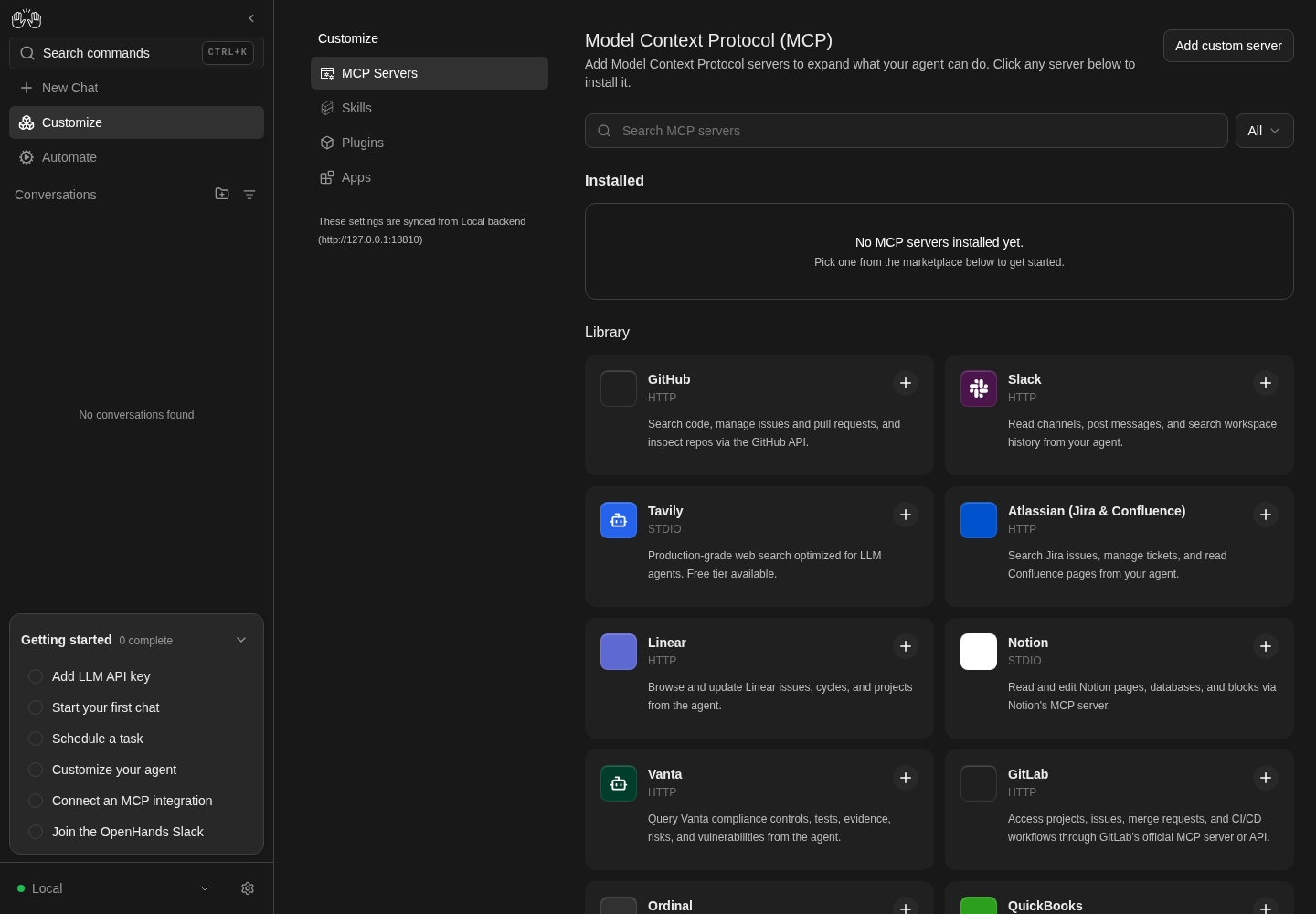
MCP page shows its header, Installed empty state, and library cards.
Catalog view only; no server installed or tested.
How this screenshot was taken
agent server: 1.53.0 · automation: 1.19.0 (launcher default) · canvas: 1.26.0
control-openhands browser goto /mcp
control-openhands browser text testid=mcp-installed-empty
control-openhands browser screenshot --feature F17.page-states --name catalog
Search #
- Do
control-openhands browser fill 'testid=mcp-search-input' time - Check
control-openhands browser count '[data-testid^="mcp-marketplace-card-"]'(
1,mcp-marketplace-card-time). - NoteFill
qa-zzz-nothing; - Check
control-openhands browser text 'testid=mcp-marketplace-empty'is
No matches for your search.(the installed list's search needs installed cards: it is driven at the end ofF17.install-stdio). - Do
control-openhands browser click 'testid=mcp-search-clear' - Check
control-openhands browser value 'testid=mcp-search-input'is
""and the card count is back to55.
Section filter #
- Do
control-openhands browser click 'testid=mcp-section-filter >> testid=dropdown-trigger' - Check
control-openhands browser snapshot 'testid=mcp-section-filter'(
button "Filter MCP servers" [expanded]: Allandmenu "Filter MCP servers"withAll[checked],Installed,Library) and - Do
control-openhands browser click 'testid=mcp-section-filter-library' - Notethe
main h2list above losesInstalled. - NoteOpen the dropdown again and click
testid=mcp-section-filter-installed; - Check
control-openhands browser count 'testid=mcp-marketplace-section'is
0and - Check
control-openhands browser text 'testid=mcp-section-filter >> testid=dropdown-trigger'is
Installed. - NoteRestore with
testid=mcp-section-filter-all.
Open and close the install modal #
- Do
control-openhands browser click 'testid=mcp-marketplace-card-time' - Check
control-openhands browser text 'testid=mcp-install-modal'(
Time, its description,View documentation →,Command,Cancel,Install) and - Check
control-openhands browser value 'testid=mcp-install-field-command-readonly'(
uvx mcp-server-time;browser enabledisfalse). - NoteClose with
- Do
control-openhands browser click 'testid=mcp-install-cancel' - Check
control-openhands browser count 'testid=mcp-install-modal'is
0. - NoteReopen with
- Do
control-openhands browser click 'testid=mcp-marketplace-toggle-time' - Noteand close with
- Do
control-openhands browser click 'testid=mcp-install-modal-close' - NoteKeyboard:
- Do
control-openhands browser focus 'testid=mcp-marketplace-card-time' - Do
control-openhands browser press Enter(count
1), - Do
control-openhands browser press Escape(count
0).
Remote entry, masked key #
- Do
control-openhands browser click 'testid=mcp-marketplace-card-stripe' - Check
control-openhands browser value 'testid=mcp-install-modal >> testid=mcp-install-field-url'is
https://mcp.stripe.com/andbrowser enabledon it isfalse. - NoteClick
testid=mcp-install-modal >> testid=mcp-install-submitwith the key empty: - Do
control-openhands browser eval "document.querySelector('[data-testid=mcp-install-field-api_key]').validationMessage"is
Please fill out this field.and no request is sent. - Do
control-openhands browser fill 'testid=mcp-install-modal >> testid=mcp-install-field-api_key' rk_test_qa_dummy_000 - Check
control-openhands browser attr 'testid=mcp-install-modal >> testid=mcp-install-field-api_key' typeis
passwordand - Do
control-openhands browser screenshot 'testid=mcp-install-modal' --feature F17.install-remote --name stripe-maskedshows dots.
- NoteCancel; never click Install with a dummy key on a hosted server.
OAuth entry #
- Do
control-openhands browser click 'testid=mcp-marketplace-card-granola' - Check
control-openhands browser text 'testid=mcp-install-modal >> testid=mcp-install-oauth-info' - Note:
This server uses OAuth for authentication. Click Install to connect — you will be redirected to authorize access.andNo API key needed. The server handles the OAuth flow automatically.The URL field readshttps://mcp.granola.ai/mcpand there is nomcp-install-field-api_key. - NoteCancel; Install would start a real OAuth flow.
Entry that cannot be installed #
- Do
control-openhands browser click 'testid=mcp-marketplace-card-sentry' - Check
control-openhands browser network --clear - Do
control-openhands browser click 'testid=mcp-install-modal >> testid=mcp-install-submit' - Check
control-openhands browser network --last 5 - Check
control-openhands browser count 'testid=mcp-install-modal' - Check
control-openhands browser toasts - NoteExpected: such entries are hidden from the library, or the modal explains that the local backend cannot install them.
- NoteToday the modal shows only the title, description and docs link, Install sends no request, shows nothing and the modal stays open (fail;
cloudflare-bindingsbehaves the same). - NoteCancel.
Install fails, modal stays #
- NoteMake the server unable to start: behind the TLS proxy, move the seeded trust settings aside (shell arrange:
mv "$OH_VERIFY_RUN/private/home/.config/uv/uv.toml"{,.off}andmv "$OH_VERIFY_RUN/private/home/.npmrc"{,.off}) and use an entry uv has never downloaded in this run, such as Fetch (Time succeeds from the uv cache once installed). - Do
control-openhands browser click 'testid=mcp-marketplace-card-fetch'(
browser value 'testid=mcp-install-field-command-readonly'isuvx mcp-server-fetch) and - Do
control-openhands browser click 'testid=mcp-install-submit' --observe 'testid=mcp-install-submit' --observe-ms 15000 - Notethe observed labels are
Install,Verifying… [disabled],Install(about 6 s). - Check
control-openhands browser text 'testid=mcp-install-modal-error'is
Connection failed: McpError: Connection closedand the modal stays open (<run>/private/stack.logshowsUnknownIssuer). - ExpectAn npx entry such as Memory fails differently: after about 17 s the error reads
Connection timed out. Check the URL and try again.Cancel, - Do
control-openhands browser reload - Check
control-openhands browser count 'testid=mcp-installed-empty'is still
1(nofetchcard). - NoteRestore the trust files (
mv ….offback) before the next bullet.
Install a STDIO entry #
- NoteWith the TLS precondition, run
- Do
control-openhands browser click 'testid=mcp-marketplace-card-time' - Do
control-openhands browser click 'testid=mcp-install-modal >> testid=mcp-install-submit' --observe 'testid=mcp-install-modal >> testid=mcp-install-submit' --observe-ms 20000 - Note:
Install,Verifying…,Saving..., then<absent>(closed). - NoteAfter
- Do
control-openhands browser reload - Check
control-openhands browser text 'testid=mcp-server-item >> has-text=Timezone-aware'is
Time,STDIO,Timezone-aware current time, conversions, and timestamp formatting.,uvx mcp-server-time,Not checked yet,Test connection; itsdata-server-idistime. - NoteInstalling it again (same two commands, then
browser reload) adds a second card (time_1): the library is add-only and its + toggle never shows installed (aria-checkedstaysfalse). - ExpectThe copy keeps the Time catalog identity (#18034):
- Check
control-openhands browser text '[data-server-id=time_1]'is
time_1,STDIO,Timezone-aware current time, conversions, and timestamp formatting.,uvx mcp-server-time,Not checked yet,Test connection(the title is the settings key because it differs from the catalog id), and - Do
control-openhands browser eval "[...document.querySelectorAll('[data-testid=mcp-server-item]')].map(c=>c.dataset.serverId+':'+c.querySelector('span[aria-hidden=true][title]')?.title)"is
["time:Time","time_1:Time"](both badges come from the Time entry). - NoteTime has no logo, so both installed cards show the generic puzzle glyph where its library card shows a robot glyph.
- NoteSearch the installed list:
- Do
control-openhands browser fill 'testid=mcp-search-input' Timezone - Notekeeps both cards (
browser eval "[...document.querySelectorAll('[data-testid=mcp-server-item]')].map(c=>c.dataset.serverId)"is["time","time_1"], matched by the catalog description) and one library card; - Do
control-openhands browser fill 'testid=mcp-search-input' qa-zzz-nothing - Notemakes
- Check
control-openhands browser text 'testid=mcp-installed-empty-search' - Expect
No matches for your search.; clear with - Do
control-openhands browser click 'testid=mcp-search-clear' - Do
control-openhands browser screenshot --feature F17.install-stdio --name time-and-time_1shows both cards with the description.
Argument fields #
- Do
control-openhands browser click 'testid=mcp-marketplace-card-filesystem' - Check
control-openhands browser snapshot 'testid=mcp-install-modal'shows the read-only
Commandnpx -y @modelcontextprotocol/server-filesystem, aPaths (space separated)field andEach whitespace-separated token is appended as its own argument.; - Check
control-openhands browser attr 'testid=mcp-install-modal >> role=link' targetis
_blank(View documentation →,relnoreferrer). - NoteClick
testid=mcp-install-submitwith the field empty: - Do
control-openhands browser eval "document.querySelector('[data-testid=mcp-install-field-paths]').validationMessage"is
Please fill out this field.andbrowser networkrecords no request. - NoteShell arrange
mkdir -p "$OH_VERIFY_RUN/workspace/qa-fs-a" "$OH_VERIFY_RUN/workspace/qa-fs-b", then - Do
control-openhands browser fill 'testid=mcp-install-modal >> testid=mcp-install-field-paths' "$OH_VERIFY_RUN/workspace/qa-fs-a $OH_VERIFY_RUN/workspace/qa-fs-b" - Do
control-openhands browser click 'testid=mcp-install-modal >> testid=mcp-install-submit' --observe 'testid=mcp-install-modal >> testid=mcp-install-submit' --observe-ms 90000(
Install,Verifying…,Saving...,<absent>). - ExpectAfter
browser reload, - Check
control-openhands browser text '[data-server-id=filesystem]' - Noteends the command line with both paths, and
- Check
control-openhands api GET /api/settings --pick agent_settings.mcp_config.filesystemhas
args["-y","@modelcontextprotocol/server-filesystem","<…>/qa-fs-a","<…>/qa-fs-b"].
Save as secret #
- NoteWith the TLS precondition and no
TAVILY_API_KEYsecret (control-openhands api GET /api/settings/secrets), run - Do
control-openhands browser click 'testid=mcp-marketplace-card-tavily' - Check
control-openhands browser attr 'testid=mcp-install-modal >> testid=mcp-install-field-TAVILY_API_KEY' typeis
password, - Do
control-openhands browser eval "document.querySelector('[data-testid=mcp-install-save-secret-TAVILY_API_KEY] input').checked"is
true, and - Do
control-openhands browser tooltip 'testid=mcp-install-modal >> role=button[name=/secret/i]'is
MCP credentials aren't shared with automations. Save as a secret to make this value available to automations.Run - Do
control-openhands browser fill 'testid=mcp-install-modal >> testid=mcp-install-field-TAVILY_API_KEY' tvly-qa-dummy-000 - Do
control-openhands browser click 'testid=mcp-install-modal >> testid=mcp-install-submit' --observe 'role=status' --observe-ms 60000 - Notethe observed toasts are
MCP server saved.andSaved to secrets: TAVILY_API_KEY. - Do
control-openhands browser goto /settings/secrets - Check
control-openhands browser count 'testid=secret-item >> has-text=TAVILY_API_KEY'is
1. - ExpectThe GitHub card's hosted token has the same toggle (
mcp-install-save-secret-GITHUB_PERSONAL_ACCESS_TOKEN, checked). - NoteClean up by deleting the
tavilyserver (Delete below) and the secret through F14's Delete recipe.
Editor validation #
- Do
control-openhands browser goto /mcp(Save as secret ends on
/settings/secrets), - Do
control-openhands browser click 'testid=mcp-add-custom-server' - NoteWith the default SSE type, click
testid=add-mcp-server-form >> testid=submit-buttonafter each change and read - Check
control-openhands browser text 'testid=add-mcp-server-form >> css=p.text-red-500 >> nth=0' - Note: empty URL →
URL is required; - Do
control-openhands browser fill 'testid=add-mcp-server-form >> testid=url-input' 'not a url' - Note→
Invalid URL format;ftp://127.0.0.1/mcp→URL must use http:// or https://; URLhttp://127.0.0.1:9/sseplustestid=server-name-input'bad name'→Name can only contain letters, numbers, hyphens, and underscores; nameqa_sse, then - Do
control-openhands browser click 'testid=add-mcp-server-form >> testid=auth-mode-dropdown' - Do
control-openhands browser click 'role=option[name="Header"]' - Note→
Header authentication requires a header; authOAuthwithtestid=oauth-client-secret-inputfilleddummy-secret→OAuth client secret requires a client ID. - NoteSwitch type with
- Do
control-openhands browser click 'testid=add-mcp-server-form >> testid=server-type-dropdown' - Do
control-openhands browser click 'role=option[name="SHTTP"]' - Noteset auth back to
None;testid=timeout-input0→Timeout must be positive,5000→Timeout cannot exceed 3600 seconds (1 hour). - NoteSwitch to
STDIO: empty →Name is required;testid=name-input'bad name!'→ the invalid-name message; nameqa_time→Command is required;testid=command-input'uvx mcp-server-time'→Command cannot contain spaces; commanduvxplustestid=env-inputNOEQUALS→Environment variables must follow KEY=value format. - NoteOnce a STDIO
qa_timeexists (or any installed STDIO id such astime), the same name givesA STDIO server with this name already exists. - Do
control-openhands browser press Escape - Notecloses the editor.
- NoteHeader format: reopen the editor, pick
SHTTP, fillurl-inputhttp://127.0.0.1:9/mcp, authHeader, - Do
control-openhands browser fill 'testid=add-mcp-server-form >> testid=headers-input' NOEQUALS - Noteand submit.
- NoteExpected a header-specific message; today it reads
Environment variables must follow KEY=value format(fail: the header check reuses the env validator's copy).
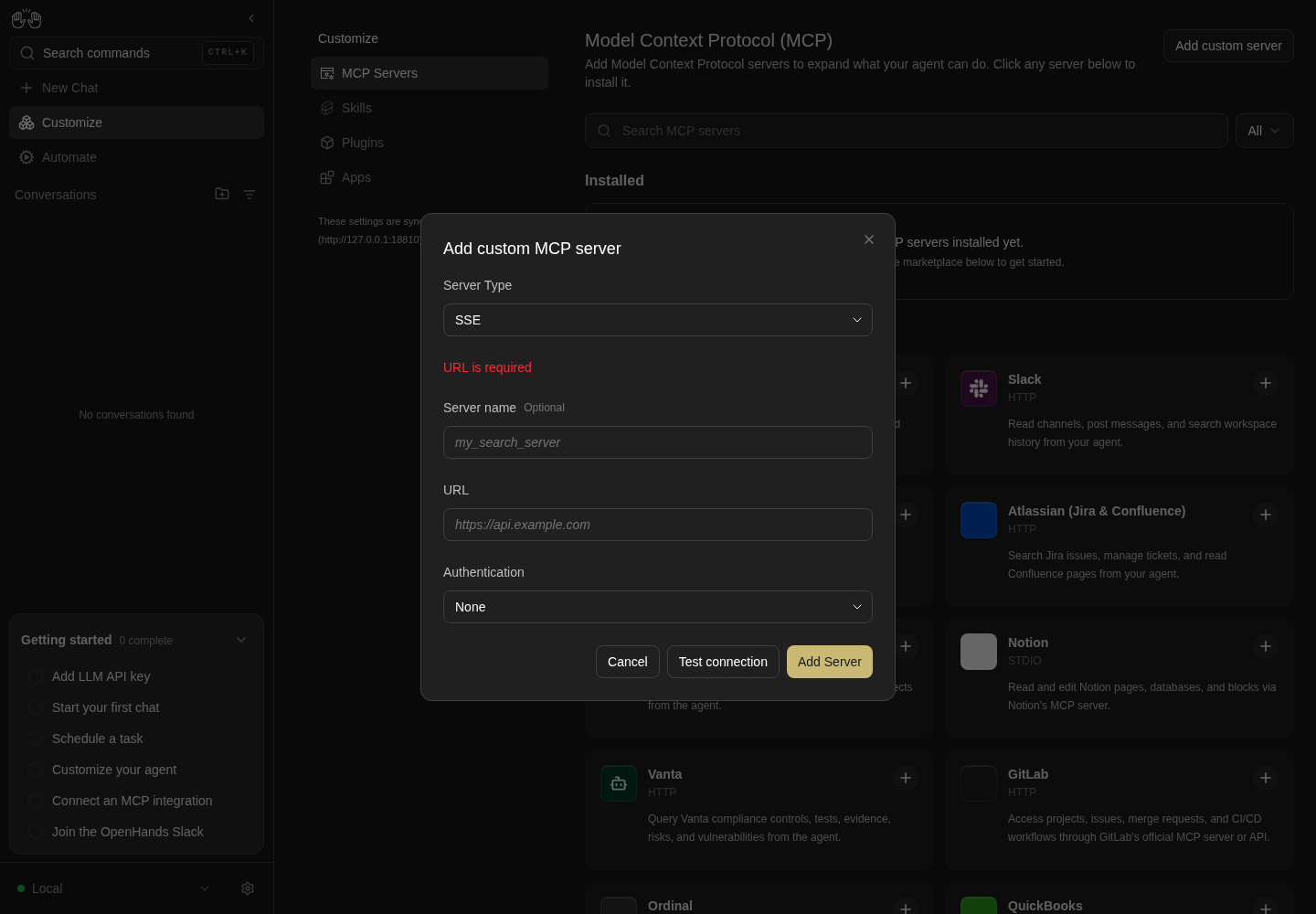
Submitting the empty SSE form shows URL is required.
Only empty-URL validation illustrated; other transports and validation cases are not asserted.
How this screenshot was taken
agent server: 1.53.0 · automation: 1.19.0 (launcher default) · canvas: 1.26.0
control-openhands browser goto /mcp
control-openhands browser click testid=mcp-add-custom-server
control-openhands browser click 'testid=add-mcp-server-form >> testid=submit-button'
control-openhands browser screenshot --feature F17.custom-validation --name custom-validation
Test connection #
- NoteFailure: in an SHTTP form with URL
http://127.0.0.1:9/mcpand timeout10, clicktestid=add-mcp-server-form >> testid=mcp-test-connection, - Wait
control-openhands browser wait 'testid=add-mcp-server-form >> testid=mcp-test-message' --timeout 60000 - Notethe text is
Could not reach the server (check the URL and server type): Client failed to connect: All connection attempts failed(the remote wording followed by the Agent Server's detail) and its class containstext-red-500. - NoteClicking Add Server leaves the editor open (
browser count 'testid=mcp-custom-editor'is1). - NoteSuccess: in a STDIO form fill
testid=name-inputqa_time,testid=command-inputuvx, - Do
control-openhands browser fill 'testid=add-mcp-server-form >> testid=args-input' mcp-server-time - Do
control-openhands browser fill 'testid=add-mcp-server-form >> testid=env-input' UV_NATIVE_TLS=true - Do
control-openhands browser click 'testid=add-mcp-server-form >> testid=mcp-test-connection' --observe 'testid=add-mcp-server-form >> testid=mcp-test-connection' --observe-ms 20000(
Test connection,Verifying…,Test connection), the samewaitand - Check
control-openhands browser text 'testid=add-mcp-server-form >> testid=mcp-test-message' - Note:
Connected — 2 tool(s) available, classtext-green-500. - Do
control-openhands browser screenshot 'testid=mcp-custom-editor' --feature F17.test-connection --name stdio-success
Add the server #
- NoteIn the successful STDIO form run
- Do
control-openhands browser click 'testid=add-mcp-server-form >> testid=submit-button' - Wait
control-openhands browser wait 'testid=mcp-custom-editor' --state detached --timeout 60000 - Do
control-openhands browser reload - Check
control-openhands browser text 'testid=mcp-server-item >> has-text=qa_time' - Note:
qa_time,STDIO,Timezone-aware current time, conversions, and timestamp formatting.,uvx mcp-server-time,Not checked yet,Test connection(it runs the Time entry's command and args, so it shows that entry's description and badge under its own name, #18034). - Check
control-openhands browser attr 'testid=mcp-server-item >> has-text=qa_time' data-server-idis
qa_time(the id in the per-card test ids below) and itsaria-labelisEdit qa_time.
Custom remote server #
- NoteWith the Streamable HTTP fixture from Preconditions running, run
- Do
control-openhands browser click 'testid=mcp-add-custom-server' - Notepick
SHTTP(server-type-dropdown, thenrole=option[name="SHTTP"]), filltestid=add-mcp-server-form >> testid=server-name-inputqa_shttpandurl-inputhttp://127.0.0.1:38417/mcp, pick authBearer token(auth-mode-dropdown, thenrole=option[name="Bearer token"]) and filltestid=add-mcp-server-form >> testid=api-key-inputqa-dummy-token(browser attr ... typeispassword). - NoteClick
testid=add-mcp-server-form >> testid=mcp-test-connection; - Check
control-openhands browser text 'testid=add-mcp-server-form >> testid=mcp-test-message' --timeout 60000is
Connected — 13 tool(s) available. - NoteClick
testid=add-mcp-server-form >> testid=submit-button, wait fortestid=mcp-custom-editorto detach andbrowser reload: - Check
control-openhands browser text '[data-server-id=qa_shttp]'is
qa_shttp,HTTP,http://127.0.0.1:38417/mcp,Not checked yet,Test connection; - Check
control-openhands api GET /api/settings --pick agent_settings.mcp_config.qa_shttphas
transporthttpandauth{"strategy":"bearer","value":"**********"}. - ExpectIts health probe reads
Reachable — credentials not verified. - NoteReopen it with
- Do
control-openhands browser click 'testid=mcp-server-detail-qa_shttp' - Note:
browser snapshot 'testid=mcp-custom-editor'showsEdit MCP server, comboboxAuthenticationBearer token, and - Check
control-openhands browser value 'testid=edit-mcp-server-form >> testid=api-key-input'is
**********; Escape. - NoteAgent side:
- Wait
control-openhands conversation start --prompt "Call the qa_shttp MCP server's echo tool with message qa-ping. Do not use the terminal. Reply with only the tool's output." --wait --timeout 240 - Check
control-openhands conversation events <id> --kinds ActionEvent,ObservationEvent,MessageEvent - Note: tool
qa_shttp_echo, observationEcho: qa-ping. - Do
control-openhands browser goto /mcp
Card health #
- Do
control-openhands browser click 'testid=mcp-health-probe-qa_time' --observe 'testid=mcp-health-label-qa_time' --observe-ms 20000 - Note:
Not checked yet,Checking connection…,Reachable — credentials not verified. - Check
control-openhands browser text 'testid=mcp-server-health-qa_time' - Noteadds the hint
This check only proves the server is reachable and lists its tools; it does not verify your credentials., - Check
control-openhands browser attr 'testid=mcp-server-health-qa_time >> testid=mcp-health-dot' data-statusis
healthy-connectivity, and the click did not open the editor (browser count 'testid=mcp-custom-editor'is0). - NoteFailure: the editor refuses to save a broken server, so arrange one with
- Arrange
control-openhands api POST /api/settings/mcp/qa_broken --data '{"transport":"stdio","command":"qa-no-such-command","enabled":false}' --write - Do
control-openhands browser reload - Notethen click
testid=mcp-health-probe-qa_broken: the label isCould not start the server command: Client failed to connect: [Errno 2] No such file or directory: 'qa-no-such-command'in red (STDIO wording, no URL hint; the card clamps it to two lines,browser text 'testid=mcp-server-health-qa_broken'reads it whole), the dot'sdata-statusisfailedand the button readsRetry; - Do
control-openhands browser screenshot 'testid=mcp-server-item >> has-text=qa_broken' --feature F17.server-health --name failed
Delete #
- Do
control-openhands browser click 'testid=mcp-server-detail-qa_broken'(a click on the card's centre lands on its health row and opens nothing: see Gotchas),
- Do
control-openhands browser click 'testid=mcp-custom-editor-delete' - Check
control-openhands browser text 'testid=confirmation-modal'(
Are you sure you want to delete this server?,Cancel,Confirm). - Do
control-openhands browser click 'testid=confirmation-modal >> testid=cancel-button' - Notethe editor is still open.
- NoteClick Delete again, then
- Do
control-openhands browser click 'testid=confirmation-modal >> testid=confirm-button' - Check
control-openhands browser toasts(
MCP server removed.). - NoteAfter
- Do
control-openhands browser reload - Check
control-openhands browser count 'testid=mcp-server-item >> has-text=qa_broken'is
0, and - Check
control-openhands api GET /api/settingshas no
qa_broken.
Edit #
- Do
control-openhands browser click 'testid=mcp-server-detail-qa_time'(the detail line opens the editor on every card; a plain click on the card's centre happens to open it on
qa_time, whose Time description fills the centre, but not on a card without a description; keyboard:browser focus '[data-server-id=qa_time]'thenbrowser press Enter) and - Check
control-openhands browser snapshot 'testid=mcp-custom-editor' - Note: heading
Edit MCP server, no Server Type field, aDeletebutton; - Check
control-openhands browser value 'testid=edit-mcp-server-form >> testid=env-input'is
UV_NATIVE_TLS=**********. - Do
control-openhands browser fill 'testid=edit-mcp-server-form >> testid=args-input' $'mcp-server-time\n--local-timezone\nUTC'(bash ANSI-C quoting for the newlines), click
testid=edit-mcp-server-form >> testid=mcp-test-connection(stillConnected — 2 tool(s) available: the stored env value is reused), then - Do
control-openhands browser click 'testid=edit-mcp-server-form >> testid=submit-button' - Noteand wait for
testid=mcp-custom-editorto detach. - ExpectThe card shows a verdict at once (seeded from the save's test).
- NoteAfter
- Do
control-openhands browser reload - Check
control-openhands browser text 'testid=mcp-server-detail-qa_time'is
uvx mcp-server-time --local-timezone UTC.
Stored secrets are reused, not their placeholder #
- NoteMake a STDIO server that only starts with the right secret:
- Arrange
control-openhands fixture mcp-server --name qa-vault - Noteprints
<node>and<server.mjs>. - Do
control-openhands browser click 'testid=mcp-add-custom-server' - Notepick
STDIO, filltestid=add-mcp-server-form >> testid=name-inputqa_vaultandtestid=add-mcp-server-form >> testid=command-input/bin/sh, then - Do
control-openhands browser fill 'testid=add-mcp-server-form >> testid=args-input' $'-c\ntest "$QA_VAULT_TOKEN" = qa-vault-secret-000 && exec "$QA_NODE" "$QA_SERVER"' - Do
control-openhands browser fill 'testid=add-mcp-server-form >> testid=env-input' $'QA_VAULT_TOKEN=qa-vault-secret-000\nQA_NODE=<node>\nQA_SERVER=<server.mjs>' - Check
control-openhands browser network --clear - Noteclick
testid=add-mcp-server-form >> testid=mcp-test-connection; - Check
control-openhands browser text 'testid=add-mcp-server-form >> testid=mcp-test-message' --timeout 60000is
Connected — 1 tool(s) available. - NoteDirect proof of what the page sent:
- Check
control-openhands browser network --bodies --filter 'api/mcp/test' --last 1lists one
POST /api/mcp/test(200) whosebodyis{"server":{"type":"stdio","command":"/bin/sh","args":["-c","test \"$QA_VAULT_TOKEN\" = qa-vault-secret-000 && exec \"$QA_NODE\" \"$QA_SERVER\""],"env":{"QA_VAULT_TOKEN":"<redacted 19 chars>","QA_NODE":"<redacted 40 chars>","QA_SERVER":"<redacted 142 chars>"}},"name":"qa_vault"}: the command and args in clear, each env value replaced by the CLI with the length of the real value (19 forqa-vault-secret-000; 40 and 142 are<node>and<server.mjs>on this machine,${#var}in a shell). - NoteClick
testid=add-mcp-server-form >> testid=submit-button, - Wait
control-openhands browser wait 'testid=mcp-custom-editor' --state detached --timeout 60000 - Do
control-openhands browser reload - Check
control-openhands api GET /api/settings --pick agent_settings.mcp_config.qa_vaulthas
env{"QA_VAULT_TOKEN":"**********","QA_NODE":"**********","QA_SERVER":"**********"}(every env value is redacted; the page reads this same endpoint, there is noGET /api/settings/mcp). - Do
control-openhands browser click 'testid=mcp-server-detail-qa_vault' - Check
control-openhands browser value 'testid=edit-mcp-server-form >> testid=env-input'is the three lines
QA_VAULT_TOKEN=**********,QA_NODE=**********,QA_SERVER=**********. - Check
control-openhands browser network --clear - Noteand click
testid=edit-mcp-server-form >> testid=mcp-test-connection: - Check
control-openhands browser text 'testid=edit-mcp-server-form >> testid=mcp-test-message' --timeout 60000is
Connected — 1 tool(s) available, which the shell gate only allows when the stored token, binary and path were sent (control-openhands browser screenshot 'testid=mcp-custom-editor' --feature F17.stored-secret-reuse --name masked-test-ok). - ExpectThe same
- Check
control-openhands browser network --bodies --filter 'api/mcp/test' --last 1 - Noterow now carries
"env":{"QA_VAULT_TOKEN":"<redacted 120 chars>","QA_NODE":"<redacted 140 chars>","QA_SERVER":"<redacted 268 chars>"}: neither the**********placeholder (which--bodieswould keep as is) nor the typed lengths. - Check
control-openhands browser network --last 5shows why: a
GET /api/settings(and/server_info) right before the POST. - ExpectThe page fetches the settings in
encryptedmode and swaps each placeholder for the stored encrypted value (src/api/mcp-service/mcp-redacted-credentials.ts), which the Agent Server decrypts, so the browser never holds the plaintext and the lengths are those of Fernet tokens of the real values (19 → 120, 40 → 140, 142 → 268). - ExpectCounter-check that the gate bites:
- Do
control-openhands browser fill 'testid=edit-mcp-server-form >> testid=env-input' $'QA_VAULT_TOKEN=qa-wrong\nQA_NODE=**********\nQA_SERVER=**********' - Check
control-openhands browser network --clear - Noteclick Test connection again and
- Wait
control-openhands browser wait 'testid=edit-mcp-server-form >> testid=mcp-test-message >> text=Connection' --timeout 90000 - Notethe text is red and reads
Connection failed: McpError: Connection closedor, when the client only notices at its deadline,Connection timed out. Check the URL and try again.(the gate exits before the MCP handshake; see Gotchas;--name wrong-token), and the--bodiesrow shows"QA_VAULT_TOKEN":"<redacted 8 chars>"next to the two kept placeholders at140and268chars: only the retyped value replaced its stored one. - Do
control-openhands browser click 'testid=mcp-custom-editor-close' - Notediscards it (
count 'testid=mcp-custom-editor'0); reopen withtestid=mcp-server-detail-qa_vault: the env is the three placeholders again and Test connection isConnected — 1 tool(s) available. - Do
control-openhands browser press Escape - NoteSave with the placeholders in place: reopen with
- Do
control-openhands browser click 'testid=mcp-server-detail-qa_vault' - Noteappend one harmless argument (it only becomes the shell script's
$0) with - Do
control-openhands browser fill 'testid=edit-mcp-server-form >> testid=args-input' $'-c\ntest "$QA_VAULT_TOKEN" = qa-vault-secret-000 && exec "$QA_NODE" "$QA_SERVER"\nqa-v2' - Noteleave
env-inputas the three placeholders, run - Check
control-openhands browser network --clear - Do
control-openhands browser click 'testid=edit-mcp-server-form >> testid=submit-button' --observe 'testid=edit-mcp-server-form >> testid=submit-button' --observe-ms 6000(
Save Server,Save Server [disabled],<absent>) and - Wait
control-openhands browser wait 'testid=mcp-custom-editor' --state detached --timeout 60000 - Check
control-openhands browser network --bodies --filter 'api/settings/mcp' --last 3lists one
PATCH /api/settings/mcp/qa_vault(200) whosebodyis{"transport":"stdio","command":"/bin/sh","args":["-c","test \"$QA_VAULT_TOKEN\" = qa-vault-secret-000 && exec \"$QA_NODE\" \"$QA_SERVER\"","qa-v2"]}: a sparse patch with noenvkey at all (untouched secrets are left out, so the server keeps its stored values; neither the placeholder nor an encrypted value travels). - ExpectThe same
- Check
control-openhands browser network --filter 'api/settings/mcp' --last 3 - Notewithout
--bodieslists that row without abodyfield. - ExpectThe card's health label reads
Reachable — credentials not verified. - NoteAfter
- Do
control-openhands browser reload - Check
control-openhands api GET /api/settings --pick agent_settings.mcp_config.qa_vault.envis still
{"QA_VAULT_TOKEN":"**********","QA_NODE":"**********","QA_SERVER":"**********"}, - Check
control-openhands api GET /api/settings --pick agent_settings.mcp_config.qa_vault.args - Noteends with
qa-v2, and - Check
control-openhands browser text 'testid=mcp-server-detail-qa_vault' - Noteends with
"$QA_SERVER" qa-v2. - NoteReopen with
- Do
control-openhands browser click 'testid=mcp-server-detail-qa_vault'(the env is the three placeholders), run
- Check
control-openhands browser network --clear - Noteand click
testid=edit-mcp-server-form >> testid=mcp-test-connection: - Check
control-openhands browser text 'testid=edit-mcp-server-form >> testid=mcp-test-message' --timeout 60000is
Connected — 1 tool(s) availableagain, which the gate only allows if the Save kept the real token, binary and path rather than storing the placeholder text (--name saved-with-placeholders), and the--bodiesrow carriesqa-v2inargswith the three encrypted lengths (120,140,268) inenv. - Do
control-openhands browser press Escape
One request per mutation #
- NoteWith
qa_vaultas the sibling, run - Check
control-openhands browser network --clear - Do
control-openhands browser click 'testid=mcp-add-custom-server' - Notepick
STDIO, filltestid=add-mcp-server-form >> testid=name-inputqa_docs,testid=add-mcp-server-form >> testid=command-input<node>andtestid=add-mcp-server-form >> testid=args-input<server.mjs>, clicktestid=add-mcp-server-form >> testid=submit-buttonand - Wait
control-openhands browser wait 'testid=mcp-custom-editor' --state detached --timeout 60000 - Check
control-openhands browser network --filter '/api/settings/mcp'has
total1, aPOST /api/settings/mcp/qa_docswith status201, and - Check
control-openhands browser network --filter qa_vaulthas
total0. - NoteEdit:
- Check
control-openhands browser network --clear - Do
control-openhands browser click 'testid=mcp-server-detail-qa_docs' - Do
control-openhands browser fill 'testid=edit-mcp-server-form >> testid=args-input' $'<server.mjs>\n--qa-v2' - Noteclick
testid=edit-mcp-server-form >> testid=submit-buttonand the samewait; the filter now lists onePATCH /api/settings/mcp/qa_docs(200) and - Check
control-openhands api GET /api/settings --pick agent_settings.mcp_config.qa_docs.args - Noteends with
--qa-v2. - NoteDelete:
- Check
control-openhands browser network --clear - Do
control-openhands browser click 'testid=mcp-server-detail-qa_docs' - Do
control-openhands browser click 'testid=mcp-custom-editor-delete' - Do
control-openhands browser click 'testid=confirmation-modal >> testid=confirm-button' - Wait
control-openhands browser wait '[data-server-id=qa_docs]' --state detached --timeout 10000 - Notethe filter lists one
DELETE /api/settings/mcp/qa_docs(200). - NoteSibling:
- Check
control-openhands api GET /api/settings --pick agent_settings.mcp_config.qa_vaultis unchanged from the end of the previous bullet (command
/bin/sh, args still ending withqa-v2, the three**********env values,enabledtrue), and after - Do
control-openhands browser click 'testid=mcp-server-detail-qa_vault' - Noteits Test connection still reads
Connected — 1 tool(s) available: the stored secrets survived the sibling's writes. - Do
control-openhands browser press Escape
Credential probe #
- NoteGitHub (hosted): run
- Do
control-openhands browser click 'testid=mcp-marketplace-card-github' - Do
control-openhands browser fill 'testid=mcp-install-modal >> testid=mcp-install-field-api_key' ghp_qaInvalid000 - Check
control-openhands browser network --clear - Do
control-openhands browser click 'testid=mcp-install-modal >> testid=mcp-install-submit' --observe 'testid=mcp-install-modal >> testid=mcp-install-submit' --observe-ms 20000(
Install,Verifying…,Install) and - Check
control-openhands browser text 'testid=mcp-install-modal-error' - ExpectThe server refuses the token before any tool is listed, so the probe never runs and the text is
Connection failed: HTTPStatusError: Client error '401 Unauthorized' for url 'https://api.githubcopilot.com/mcp/' …; the modal stays open (control-openhands browser count 'testid=mcp-install-modal'is1), - Check
control-openhands browser network --filter 'api/(mcp|settings)'shows one
POST /api/mcp/testand no/api/settings/mcpwrite, - Check
control-openhands api GET /api/settings --pick agent_settings.mcp_config.githubhas no value and
- Check
control-openhands api GET /api/settings/secretslists no
GITHUB_PERSONAL_ACCESS_TOKEN(control-openhands browser screenshot 'testid=mcp-install-modal' --feature F17.credential-probe --name github-invalid); - Do
control-openhands browser click 'testid=mcp-install-cancel' - NoteSlack (stdio; it lists 8 tools with any token, so only the probe, a channel listing, can tell a bad token):
- Do
control-openhands browser click 'testid=mcp-marketplace-card-slack' - Do
control-openhands browser fill 'testid=mcp-install-modal >> testid=mcp-install-field-SLACK_TEAM_ID' T_QA_INVALID - Do
control-openhands browser fill 'testid=mcp-install-modal >> testid=mcp-install-field-SLACK_BOT_TOKEN' xoxb-qa-invalid-000(
typepassword), - Do
control-openhands browser click 'testid=mcp-install-modal >> testid=mcp-install-submit' - Wait
control-openhands browser wait 'testid=mcp-install-modal-error' --timeout 150000(the first run downloads the package through npx, about a minute: a plain click, then one long
wait, rather than--observe-ms, which records a few transient states). - Check
control-openhands browser text 'testid=mcp-install-modal-error'is
Credential check failed: invalid_authwith direct internet; behind the TLS-intercepting proxy the probe's own HTTPS call fails first and it readsCredential check failed: fetch failed. - NoteEither way the modal stays open and
- Check
control-openhands api GET /api/settings --pick agent_settings.mcp_config.slackhas no value (
--name slack-invalid); - Do
control-openhands browser click 'testid=mcp-install-cancel' - NoteFor Slack's own verdict behind the proxy, run the same command as a custom server, which keeps the entry's probe (#18034):
- Do
control-openhands browser click 'testid=mcp-add-custom-server' - Notepick
STDIO, filltestid=add-mcp-server-form >> testid=name-inputqa_slack,testid=add-mcp-server-form >> testid=command-inputnpx, - Do
control-openhands browser fill 'testid=add-mcp-server-form >> testid=args-input' $'-y\n@zencoderai/slack-mcp-server' - Do
control-openhands browser fill 'testid=add-mcp-server-form >> testid=env-input' $'SLACK_TEAM_ID=T_QA_INVALID\nSLACK_BOT_TOKEN=xoxb-qa-invalid-000\nNODE_EXTRA_CA_CERTS=/root/.ccr/ca-bundle.crt'(your proxy's CA bundle), then
- Do
control-openhands browser click 'testid=add-mcp-server-form >> testid=mcp-test-connection' - Check
control-openhands browser text 'testid=add-mcp-server-form >> testid=mcp-test-message' --timeout 90000 - Note:
Credential check failed: invalid_auth, classtext-red-500(control-openhands browser screenshot 'testid=mcp-custom-editor' --feature F17.credential-probe --name slack-custom-invalid-auth). - Do
control-openhands browser click 'testid=add-mcp-server-form >> testid=submit-button' --observe 'testid=add-mcp-server-form >> testid=submit-button' --observe-ms 20000(
Add Server,Add Server [disabled],Add Server: Save tests first) keeps the editor open (control-openhands browser count 'testid=mcp-custom-editor'is1) with the same red message, and - Check
control-openhands api GET /api/settings --pick agent_settings.mcp_config.qa_slackhas no value; close it with
- Do
control-openhands browser click 'testid=mcp-custom-editor-close'(an Escape pressed while the Save's test still runs is ignored).
- ExpectA server the catalog does not know gets no probe:
- Do
control-openhands browser click 'testid=mcp-health-probe-qa_vault' --observe 'testid=mcp-health-label-qa_vault' --observe-ms 20000 - Noteends on
Reachable — credentials not verified(the Card health wording).
The agent uses it #
- NoteWith
qa_timeenabled run - Wait
control-openhands conversation start --prompt "Use the qa_time MCP server's get_current_time tool with timezone UTC. Do not use the terminal. Reply with only the tool's datetime value." --wait --timeout 240 - Check
control-openhands conversation events <id> --kinds ActionEvent,ObservationEvent,MessageEvent - Notewith the
idit printed. - ExpectThere is an
ActionEventwith toolqa_time_get_current_time(MCP tools reach the agent as<server id>_<tool>), its observation reads[Tool 'qa_time_get_current_time' executed.] { "timezone": "UTC", "datetime": … }, and the agent's reply is thatdatetime. - Check
control-openhands conversation events <id> --grep qa_time_get_current_time --from-start - Notealso matches the
SystemPromptEvent(the tool was offered). - Do
control-openhands browser screenshot --feature F17.agent-uses-server --name conversationshows the tool step (its title is model-written, e.g.
Get current time in UTC via qa_time MCP) and the datetime reply.conversation startleaves the browser on the conversation: - Do
control-openhands browser goto /mcp
Enable and disable #
- NoteOn
/mcprun - Check
control-openhands browser attr 'testid=mcp-installed-toggle-qa_time' aria-checked(
true;aria-labelDisable server), - Do
control-openhands browser click 'testid=mcp-installed-toggle-qa_time' - Do
control-openhands browser reload - Noteand the same
attr(false; labelEnable server). - Check
control-openhands api GET /api/settingsshows
agent_settings.mcp_config.qa_time.enabledfalsewith command, args and env intact; - Do
control-openhands browser screenshot 'testid=mcp-server-item >> has-text=qa_time' --feature F17.enable-disable --name disabledshows the + icon.
- NoteWith no other server exposing that tool, run
- Wait
control-openhands conversation start --prompt "Without running any command: is a tool named get_current_time available to you right now? Reply with only YES or NO." --wait --timeout 240 - Notethe reply is
NO, - Check
control-openhands api GET /api/conversations/<id> --pick agent.mcp_config.qa_time.enabledis
false, and - Check
control-openhands conversation events <id> --grep qa_time_get_current_time --from-starthas
count0(noSystemPromptEventlists it). - Do
control-openhands browser goto /mcp - NoteClick the toggle again and reload; it is
true.
Phone modals #
- NoteAt
browser viewport phoneon/mcprun - Do
control-openhands browser click 'testid=mcp-add-custom-server' - Check
control-openhands browser bbox 'testid=mcp-custom-editor'(
insideViewporttrue,pageHorizontalOverflowfalse) and - Do
control-openhands browser screenshot --feature F17.phone --name custom-editor - Noteclose with
testid=mcp-custom-editor-close. - NoteDo the same for
testid=mcp-marketplace-card-stripewithtestid=mcp-install-modal(--name install-modal), then - Do
control-openhands browser viewport desktop
Cloud backend #
- NoteBlocked without an OpenHands Cloud backend.
- NoteOn the local backend
- Do
control-openhands browser click 'testid=mcp-marketplace-card-github'shows only the MCP form (
browser count 'testid=mcp-install-tab-native'is0). - NoteWith Cloud active,
browser text 'testid=extensions-navbar-desktop'should list only MCP Servers and the cloud Skills link (browser attr 'testid=sidebar-extensions-/skills' hrefends in/settings/skills), and the GitHub modal should showmcp-install-tab-native(Recommended) andmcp-install-tab-mcp.
Cleanup #
- NoteOn
/mcp(not the conversation pageconversation startleft open), deleteqa_time,qa_shttp,qa_vaultand anytime,time_1,tavily,filesystemcards through the editor's Delete: for each id,browser focus '[data-server-id=<id>]',browser press Enter,browser click 'testid=mcp-custom-editor-delete',browser click 'testid=confirmation-modal >> testid=confirm-button',browser wait '[data-server-id=<id>]' --state detached --timeout 10000. - ExpectAfter
browser reload,browser count 'testid=mcp-installed-empty'is1andapi GET /api/settings --pick agent_settings.mcp_configis{}. - NoteDelete the
TAVILY_API_KEYsecret on/settings/secrets(F14:testid=secret-item >> has-text=TAVILY_API_KEY >> testid=delete-secret-button, thentestid=confirmation-modal >> testid=confirm-button), stop the Streamable HTTP fixture by its PID, and restoredeepseek-flashas the active profile if you changed it.
Gotchas and known limits
- Server errors on MCP mutations (a 404 on a server that is already removed, a 502 while the Agent Server is down) toast the server's message (
MCP server '<id>' was not found), orAn error occurredwhen the body has none (#18051). Expected: one toast per failed action. Known failure (reproduced 2026-10-08): a failed delete from the editor or a failed card toggle shows two identical toasts, one from the caller and one from the global mutation handler (#18181). Count them withclick ... --observe 'role=status'orbrowser toasts --history. - Desktop
/customizeis a client-side redirect:browser urlmay still read/customizefor a moment; usewait-url '/mcp(\?|$)'. - From 768 to 1023 px the sidebar rail stays and the top bar is gone, so a Customize detail page shows neither the aside nor a Back chevron; the rail's Customize link (
sidebar-skills-link, unscoped at this width) returns to the hub. - On a phone the drawer and the hidden desktop rail both render
sidebar-skills-link; scope it withtestid=sidebar-mobile-drawer >> ...or the click fails with a strict-mode error, even thoughbrowser testidslists it once. - Editor dropdowns are comboboxes: click
server-type-dropdownorauth-mode-dropdown, thenrole=option[name="..."]. Server types readSSE,STDIOandSHTTP(not "Streamable HTTP"); auth modes readNone,Bearer token,HeaderandOAuth. The type dropdown exists only when adding. - The timeout field is
type="number":browser fillrefuses letters, soTimeout must be a valid numbercannot be reached from the UI. - A red test message stays on screen when a later validation error appears, so
css=p.text-red-500can match two paragraphs; take>> nth=0(the validation error comes first). - Install-modal required fields use native browser validation (a tooltip, no paragraph): assert
validationMessage. - The installed and library toggles are
role=switchbuttons: readaria-checked, notaria-pressed. - MCP stdio servers start with a minimal environment. Behind a TLS-intercepting proxy, without trust settings in the run's private
HOME,uvxcatalog installs fail withConnection closed(<run>/private/stack.logshowsUnknownIssuer) andnpxones withConnection timed out. That is the sandbox, not the product.launchnow seeds the trust files fromSSL_CERT_FILE/NODE_EXTRA_CA_CERTS, so a fresh run installs fine andF17.install-errormust move them aside; once a package is in the run's uv cache it installs even without them. - An installed card's health row swallows clicks (so the probe button does not open the editor). On a card without a catalog description (
qa_broken) that row is the card's centre, so a plain card click opens nothing; a catalog description moves it down. Open the editor by the card's name ormcp-server-detail-<id>line, or focus the card and press Enter. conversation startleaves the browser on the conversation page; every MCP-page command after it needsbrowser goto /mcpfirst, or the per-card selectors silently wait on a page that has none.@modelcontextprotocol/server-everything sseprintedServer is runninghere but never answered on its port; use thestreamableHttpmode for the remote-server fixture.- A server without a catalog credential probe reads
Reachable — credentials not verified, neverConnected — credentials verified (N tool(s)), even without credentials. Health after a save is seeded from the pre-save test and is lost on reload (Not checked yet). - Adding a custom server shows no toast; only catalog installs and deletes toast. Assert the card after reload.
- Catalog installs are add-only: a second Time install becomes
time_1. Since #18034 (closed #17930) STDIO servers match the catalog by command plus leading args instead of by name, sotime_1and a custom server that runs a catalog command under its own name (qa_time) keep that entry's description, badge and search keywords, while a server that only borrows a catalog name does not (a STDIOfetchrunningqa-no-such-commandshows only its command) (F17.install-stdio,F17.custom-add). Twelve library entries (provider-OAuth-only, such as Sentry, HubSpot or the Cloudflare OAuth servers) open an empty modal whose Install does nothing (F17.install-unsupported) (#17922). - The section filter's trigger and menu are named
Filter MCP serverssince #18035 (closed #17939); a checkout without it reuses the conversation filter'sFilter conversations. The test ids work on both. - A malformed header line in the custom editor shows
Environment variables must follow KEY=value format(mcp-server-form.tsxruns headers throughvalidateEnvFormat) (#17958); seeF17.custom-validation. - A catalog stdio server runs with the Agent Server's minimal environment: behind a TLS-intercepting proxy its own HTTPS calls fail (
fetch failed) even when npx could download it, and the install modal has no field forNODE_EXTRA_CA_CERTS; use the custom editor with the same command to see the provider's real answer (F17.credential-probe). TheCredential check failed: fetch failedwording itself is #18161: the Slack interpreter turns anyis_errortool result into a credential failure, though the server connected and listed its tools. - GitHub's hosted MCP endpoint answers an invalid token with HTTP 401 at connect, before tools are listed, so its
get_meprobe never runs and the modal shows the connection wording (Connection failed: HTTPStatusError … 401 Unauthorized), notCredential check failed; filed as OpenHands/software-agent-sdk#5607, since the test endpoint reports the 401 aserror_kindunknown. - The shell-gated
qa_vaultfixture exits before the MCP handshake, which the Agent Server reports either at once asConnection failed: McpError: Connection closedor only at its deadline asConnection timed out. Check the URL and try again.(the timed-out wording was seen once on 2026-10-07; on 2026-10-08 all 21 tries answeredConnection closedwithin 0.4 s); neither is theCould not start the server commandwording, which needs a command that cannot be spawned at all. Wait ontext=Connection, which matches both and notConnected — …. browser network --bodiesshows what the page sent, never a secret: a value under a key that names a credential (key, token, secret, auth, pass, session, sig, credential) and every value of anenvorheadersmap becomes<redacted N chars>(N the real length), and a URL in any other string (a server'surl) keeps its host and path but loses its userinfo and the values of its secret-named query parameters (https://<redacted 2 chars>:<redacted 8 chars>@host/mcp?api_key=<redacted 17 chars>), while the settings API's**********placeholder is kept as is, so a row tells "placeholder sent" from "a value sent". The MCP editor sends neither for an untouched secret: Test connection swaps the placeholder for the stored encrypted value (aGET /api/settingsinencryptedmode first; Fernet tokens, so 120 chars for a 19-char token, 140 for 40, 268 for 142) and Save leavesenvout of its sparse PATCH altogether (F17.stored-secret-reuse). Without--bodiesno row carries abodyfield, and only app-origin writes keep one.- A browser verb's client call waits 120 s, or 10 s longer than the verb's own
--timeoutor--observe-mswhen that is longer, sobrowser wait 'testid=mcp-install-modal-error' --timeout 150000runs its full deadline and a miss ends with Playwright's timeout and a failure screenshot (before this, every call was aborted at 120 s withTimeoutError: The operation was aborted due to timeoutwhile the page kept going). For a first Slack install use a plain click, then thatwait;--observe-msis for a few transient states, not a minute-long outcome. - Known issue #17941: turning off an enabled card toggle can drop the click when the pointer moves in and presses at once (
F17.enable-disable).
Source paths: src/routes/extensions-hub.tsx, src/routes/mcp.tsx, src/components/features/skills/extensions-navigation.tsx, src/components/features/skills/extensions-mobile-hub.tsx, src/components/features/mcp-page/, src/components/features/settings/mcp-settings/mcp-server-form.tsx, src/utils/mcp-marketplace-utils.ts, src/api/mcp-health/, src/utils/mobile-section-nav.ts.